Showing posts with label Wi-Fi. Show all posts

16 June 2022

New Sony car AV receivers support fully-wireless smartphone connections

Source: Sony. Sony has launched two new car AV receivers. Simulated active screen on a Sony car AV receiver.
Source: Sony. Sony has launched two new car AV receivers.
Sony has announced two new car AV receivers, the XAV-AX6000 and the XAV-AX4000. Both in-car media receivers feature fully-wireless smartphone connectivity, so drivers can use their phones even when the devices are in a pocket.

Thanks to a Wi-Fi connection from the user’s smartphone, together with the supplied GPS antenna, voice control can be used to navigate, communicate and play music on the road.

Apple CarPlay integrates iPhones with the car audio’s display and controls, enabling users to make phone calls, access music, send and receive messages, get directions optimised for traffic and more while the driver stays focused on the road. Third-party navigation apps are supported with Apple CarPlay. Android owners can talk to Google on Android Auto and stay connected, entertained and informed while keeping their eyes on the road.

The XAV-AX6000 has a 6.95" bezel-less flush surface display with capacitive touch screen, while the XAV-AX4000 has an anti-glare touch screen.

The XAV-AX6000 also supports HDMI connectivity.

29 April 2017

Wireless@SG makes connecting easier, expands operator pool

Connecting to a Wireless@SG hotspot.
Wireless@SG, the free nationwide Wi-Fi network will now offer a new login experience and new look for both locals and tourists. By end-year, the current user name and password system will be obsolete.

The news was announced at Tech Saturday (Upsized!), Infocomm Media Development Authority's (IMDA’s) annual technology carnival to mark the start of Smart Nation Innovations week. IMDA took user feedback into consideration to streamline the login experience for Wireless@SG in a way that would not compromise security.

Associate Professor Dr Yaacob Ibrahim, Singapore Minister for Communications and Information said on the showfloor that the push to make Wireless@SG more pervasive is essential to help people in Singapore connect to and benefit from the digital economy more easily. “There are a lot of services we can offer from the government but also from the private sector,” he said.

The free Wi-Fi service is extending automatic login to non-SIM devices, a move which will eliminate the need for usernames and passwords. Previously, automatic login to Wireless@SG was available for mobile devices with SIM cards by using the EAP-SIM authentication framework. This login method, which removes the need for usernames and passwords, improves security and allows users to be verified through their SIM cards. SIM device owners would enjoy a seamless automatic connection every time they are near a Wireless@SG hotspot.

From now on users with non-SIM devices – including tablets and laptops – will get to enjoy the same convenience if an enhanced Wireless@SG app is first downloaded. The app will guide owners through a one-time setup that will only require their NRIC/FIN (Singapore ID) and mobile numbers. They will then receive a one -time password (OTP) sent via SMS to complete the setup.

Those who prefer logging in through their browsers every time they need to access Wireless@SG will also find the process more streamlined. They only need to enter their mobile numbers to receive an OTP to complete the login process.

Currently, about 90% of Wireless@SG users already enjoy automatic login using their mobile devices. IMDA expects the enhancements to benefit at least 180,000 users who have been using tablets and laptops to access Wireless@SG.

Wireless@SG is also welcoming broadband service provider MyRepublic as one of the operators offering the free Wi-Fi service. MyRepublic is the fifth addition to the group comprising M1, SingTel, StarHub and Y5ZONE.

“A digital economy needs pervasive connectivity that is fast, reliable and secure, and Wireless@SG is one of the projects that will help IMDA realise this vision. We are pleased to welcome a fifth operator on board, and we expect this would help us to deploy more hotspots more quickly in our effort to expand the Wireless@SG network,” IMDA Chief Executive Tan Kiat How said.

"Access to fast, reliable public Wi-Fi is essential to Singapore's progress as a Smart Nation. We are excited to be appointed a Wireless@SG operator and look forward to working with IMDA to deploy and improve Wireless@SG hotspots across Singapore," MyRepublic Singapore MD Yap Yong Teck said.

Wireless@SG was launched in December 2006 with 900 hotspots running at a max speed of 512kbps. Today, there are 10,000 hotspots running at 5Mbps, and these hotspots can be found in public spaces like train stations, libraries, shopping malls and restaurants. Venue owners have been asked to ensure that the estimated number of visitors they receive will each be able to enjoy 5Mbps of bandwidth, which would be enough connectivity to use email, WhatsApp or watch a YouTube video.

IMDA is on track to double its network of hotspots to 20,000 by 2018, reaching more locations such as public hospitals, hawker centres and government service centres.

Interested?

Download the Wireless@SG app to have devices configured to connect automatically to the Wireless@SGx network. The Wireless@SGx network is more secure as it uses industry-based authentication and security standards such as IEEE 802.1x and Wi-Fi Alliance. Data sent over Wireless@SGx network is also encrypted. In addition, Wireless@SGx allows users to log in automatically after an initial one-time setup, whereas Wireless@SG requires users to log in via a browser every time a connection is established. Existing user names and passwords will continue to work but will gradually be phased out.


Watch the Instavideo on the new one-time password login method for Wireless@SG

Tech Saturday (Upsized!) will run until 30 April 2017, 11am to 7pm. Drinks and treats are available for attendees. Smart Nations Innovations Week continues with innovfest unbound on 3 and 4 May

Hashtag: #techsaturday

Editor's note: I have had problems in past years with Wireless@SG prior to this - both in remembering my user name and password in the first place, and in getting a useable Wi-Fi connection thereafter. Trying out the new OTP system was painless and I was able to use Wi-Fi for Instagram on a phone which did not have a SIM card inside it.

posted from Bloggeroid

29 December 2016

Get free Wi-Fi at over 200,000 hotspots in Japan

Source: Wire and Wireless Company.  Logo for the Travel Japan Wi-Fi app.
Source: Wire and Wireless Company. Logo featuring the Wi-Fi symbol and Mt Fuji.
Japanese telecommunications company Wire and Wireless Company has marked the two-year anniversary of its free TRAVEL JAPAN Wi-Fi app with an app upgrade as well as expanded coverage for free Wi-Fi, enabled by the app.

The app also provides tourists with information on nearby shops and sightseeing spots, as well as with a wealth of discount coupons. There are no limits on Wi-Fi data usage, and no costs.

By downloading TRAVEL JAPAN Wi-Fi and completing the setup before leaving their countries, tourists can launch the app upon arrival, leave it running in the background, and get Wi-Fi access at 200,000 hotspots throughout Japan. The app enables free Wi-Fi at all the major airports in Japan, including Narita Airport and Haneda Airport in Tokyo, New Chitose Airport in Hokkaido, Fukuoka Airport in Kyushu, and Naha Airport in Okinawa. It also automatically connects with free Wi-Fi hotspots such as Wi2, Wi2_Club, Wi2premium, and Wi2premium_club at major train stations, tourist spots, popular shops, and restaurants and cafes such as Don Quijote, Bic Camera, KFC and Starbucks.

The app has already been downloaded by over 1.5 million users in the last two years. The app is available in simplified and traditional Chinese as well as in English. Currently, people from Chinese speaking countries account for nearly 45% of the user base.

Michiko Seto, Sales Engineer, Wire and Wireless Company said, "There are many spots where this TRAVEL JAPAN Wi-Fi app can be used, but the fact is that they are mainly concentrated in busy, densely populated areas like shopping districts. If the main destination on your trip is the mountains or the seaside, I recommend you to get a Wi-Fi router, and mainly use it when you're on the road or in remote locations, whereas when shopping or eating out, use the free Wi-Fi app hotspots with unlimited data usage."

Seto also stressed that there are many lookalike apps today. The TRAVEL JAPAN Wi-Fi app can be downloaded from the official website and should have the deep blue logo with the Wi-Fi symbol in white below a graphic of Mount Fuji.
 

Interested?

Download the TRAVEL JAPAN Wi-Fi app before arriving in Japan. The app is available for
Android and iOS

19 September 2016

Singtel offers three times the mobile data at a nominal cost, plus Wi-Fi calling

Source: Singtel website. A new subscription add-on gives three times the mobile data at a nominal S$9.90 for those who get a new plan, or recontract.

Singtel has debuted a mobile data add-on, DataX3, at its iPhone 7 launch event at Marina Bay Sands Convention Centre last week. With DataX3, customers enjoy triple the mobile data allowance on their plans, for S$9.90 a month. Available to Singtel Combo Plan (Combo 2 and above) customers, DataX3 follows the launch of the DataX2 add-on that was first introduced earlier this year.

“We are always looking for innovative ways to give our customers more affordable data because mobile data has become essential to most Singaporeans for communicating, shopping, banking and entertainment. DataX2 has been extremely well-received and is very popular with our customers, leading us to create an even more attractive offer of DataX3. Now, customers can choose to get more value for their money by simply adding on DataX2 or DataX3, depending on their data consumption needs,” said Yuen Kuan Moon, Chief Executive Officer, Consumer Singapore, Singtel.

DataX3 offers significant cost savings to customers. For example, a customer on a Combo 4 plan will have the option to top-up at S$9.90 per month to get a total of 12GB of mobile data. It is available to new and re-contracting customers on eligible Combo Plans with a minimum subscription period of 24 months.

Singtel also announced that it will offer WiFi Calling (also known as Voice over WiFi) to Singtel mobile postpaid customers. This service allows customers to make HD quality voice calls and send SMS via any local Wi-Fi connection without the use of an app. The calls will switch seamlessly to the Singtel 4G network when users move out of Wi-Fi hotspot coverage. This service is available at no additional cost.

“WiFi Calling is a network innovation which offers added convenience and an enhanced mobile experience to customers. Our customers can now have mobile coverage even in difficult-to-reach places such as basements and windowless rooms, as long as there is a Wi-Fi signal. This service extends our extensive mobile network to cover a wider footprint and complements our ongoing efforts in delivering the fastest and widest 4G service in Singapore**,” said Yuen.

WiFi Calling will initially be available on selected iPhone, Samsung Galaxy and Sony Xperia smartphone models*, with other devices to be supported in the coming weeks. To enjoy the service,
customers will need to switch on the VoLTE, and WiFi Calling settings on their device and ensure that it is running the latest firmware or iOS. Calls and SMS messages made over Wi-Fi will utilise the talk time and SMS bundles of customers’ mobile plans respectively.

Interested?

Pricing is as follows. Plans are only applicable to new and recontracting customers on eligible Mobile Combo Plans upon signing a two-year device agreement. A minimum subscription period of 24 months applies.

Source: Singtel. Combo mobile plans with DataX3. Compare against DataX2 plans.
Source: Singtel. Combo mobile plans with DataX3. Compare against DataX2 plans.

Read the WorkSmart Asia blog post on StarHub's 12GB mobile data plan

*Supported phones include the iPhone 7, iPhone 7 Plus, iPhone 6s, iPhone 6s Plus, iPhone SE, Samsung Galaxy S7 4G+, Samsung Galaxy S7 Edge 4G+ and Sony Xperia X Annexe.

**Singtel has the fastest and widest outdoor 4G speeds with the lowest latency rates in Singapore, according to IDA MyConnection SG survey results for January to June 2016 and IDA’s Nationwide Outdoor Service Coverage measurements for Q216.

posted from Bloggeroid

2 June 2016

Kodak Alaris introduces new networked wireless scanners

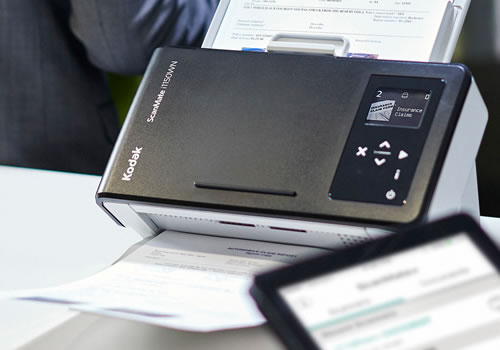
The newest desktop scanners from Kodak Alaris – the Kodak ScanMate i1150WN and the Kodak i1190WN Scanners – provide wireless and network connectivity and are mobile app ready to support BYOD and mobility in the workplace.

Source: Kodak Alaris. The Kodak ScanMate i1150WN.
Source: Kodak Alaris. The Kodak ScanMate i1150WN.
The i1150WN and i1190WN scanners, enable connectivity through the office network or over Wi-Fi for a variety of office environments. Equipped with standard drivers (TWAIN, ISIS), users can integrate the scanners with their existing and legacy business applications, eliminating extra steps in the capture process and complicated software installations. IT administrators can also set security levels and disable wireless and mobile if needed, providing them with more efficient device management. A control panel supports custom commands and offers colour-coded icons to make scanning quick and easy.

“Most wireless scanners are fine for individual users but they are not designed for sharing in a workgroup or connecting with business applications,” said Susheel John, Worldwide Category Director, Distributed Capture, Kodak Alaris Information Management. “Our wireless/network scanners offer the flexibility and versatility that users need to manage complex document processes. They also provide integration capabilities that allow organisations to invest in new software and applications to address the evolving needs of their business, while meeting the needs of legacy applications today.”

Source: Kodak Alaris. The Kodak i1190WN scanner.
The ScanMate+ Mobile App lets users scan quickly and easily to a tablet or mobile phone from the i1150WN or i1190WN scanner. The app also makes it convenient to share files via email and to cloud-based applications such as SharePoint, Box or Evernote. Organisations can integrate proprietary mobile apps with Kodak Alaris scanners using a web application programming interface (API).

Buyers Lab (BLI) recognised Kodak Alaris with the 2016 Scanner Line of the Year award for superior performance across its broad portfolio of document scanners. Kodak Alaris also won multiple BLI Winter Pick Awards—one in each of three key scanner categories: networked, departmental and production. Kodak Alaris holds the most Pick awards out of any scanner manufacturer tested by BLI.

Interested?

The ScanMate+ Mobile App is free to download for iOS and Android

Read the TechTrade Asia blog post about Kodak Alaris' BLI awards for scanners in 2016

21 February 2016

Avast Wi-Fi Finder locates reliable Wi-Fi connections around the world

Avast has announced Avast Wi-Fi Finder, an Android app designed to help consumers find reliable, fast and secure Wi-Fi connections, regardless of their location. A map interface pinpoints recommended and crowdsourced hotspots.

"Many of us have found ourselves in situations when travelling or working remotely in which we’re unable to find reliable and secure Wi-Fi,” said Gagan Singh, President of mobile at Avast. “With the Avast Wi-Fi Finder, consumers are now able to find a safe and fast Wi-Fi connection whether you’re at the gym, hotel, airport, bus station, library or café.”

In August 2015, Avast launched a product crowdsourcing program that allowed Avast Mobile Security users to help Avast harvest nearby available Wi-Fi spots. By enlisting its installed base of 230 million users, Avast collected Wi-Fi hotspot data from volunteers and evaluated each hotspot’s security level before launching Avast Wi-Fi Finder. The Avast Wi-Fi Finder is available for free and can be downloaded from Google Play.

4 February 2016

Ruckus Wireless grows small business portfolio

Ruckus Wireless has announced a new, entry-level 802.11ac access point along with the expansion and enhancement of its family of Ruckus Unleashed access points. The new products and capabilities make it even easier for small businesses to deploy high-performance Wi-Fi that meets their cost, ease-of-deployment and coverage needs.

Three new products expand the range of high-performance Wi-Fi options available to small businesses:

· Ruckus ZoneFlex R310 is an entry-level, enterprise-class 802.11ac access point. The Ruckus R310 has a low-profile form factor and delivers superior dual-band performance

· Ruckus ZoneFlex R310 Unleashed is a controller-less version of the R310. The access point eliminates the need for separate controllers and access point licenses, significantly reducing upfront costs. A simple web interface featuring a step-by-step set-up guide enables non-IT users to configure Wi-Fi in just 60 seconds and deploy in minutes

· Ruckus ZoneFlex T300 Series Unleashed are controller-less versions of Ruckus’ existing T300 access points, which provide dual-band 802.11ac access for outdoor deployments. The T300 series features a lightweight, low-profile design for easy installation, and will now allow small businesses to add outdoor connectivity to a controller-less Wi-Fi environment.

In conjunction with the new access points, new Ruckus Unleashed features to simplify management of controller-less Wi-Fi networks have been launched. The company is introducing its patented SmartMesh technology to Unleashed. With SmartMesh, small businesses no longer have to run Ethernet wiring to all indoor and outdoor access points, saving both money and time. Ruckus Unleashed also now supports SNMP protocols to easily manage and monitor network elements.

Unlike the stripped-down products for small business offered by competitors, the portfolio of Unleashed access points for small business delivers Wi-Fi performance based on Ruckus’ patented BeamFlex adaptive antenna technology and ChannelFly capacity-based channel selection. BeamFlex and ChannelFly work together to provide stronger Wi-Fi signals over longer ranges, while adapting automatically to environmental changes. This yields more stable connections, higher data rates and more concurrent users per access point.

“Small and mid-size organizations increasingly rely on Wi-Fi to engage customers, deliver services and run their businesses,” said Kash Shaikh, VP of marketing and business development at Ruckus. “Our new products help level the playing field for small businesses, local retailers, coffee shops and restaurants, so they can deliver a high-quality Wi-Fi experience indoors and outdoors – with a much lower total cost of ownership.”

The news builds on the October 2015 launch of Ruckus Unleashed, a controller-less Wi-Fi architecture that reduces ownership costs and delivers up to 50% higher Wi-Fi performance* for small and mid-size business environments. Ruckus Unleashed can manage up to 25 access points as part of a single-site network. Businesses can easily plug and play more Wi-Fi access points as their needs grow – and if multiple sites are needed, Ruckus offers an easy migration path to controller-based Wi-Fi, using the same access points.

“Wi-Fi connectivity has become an absolute requirement for customers and employees of small businesses,” said Nolan Greene, IDC Research Analyst, network infrastructure. “Business owners are often challenged to provide reliable, business-grade networks within a limited budget. Solutions like Ruckus’ new access points provide small and medium business owners with more options – covering the range of needs from indoor to outdoor, controller-based to controller-less, and cost-conscious to performance-driven.”

Interested?

Ruckus Unleashed is now available with three indoor access points – ZoneFlex R310 ($495); ZoneFlex R500 ($645); and ZoneFlex R600 ($795) – and one family of outdoor access points (ZoneFlex T300, T300E, T301N, and T301S). ZoneFlex R310 is available now. The Unleashed versions of ZoneFlex R310 and T300 series will be available in March 2016. All of these access points are also available as part of a controller-based network managed by Ruckus’ ZoneDirector and SmartZone controllers. These controller platforms include user access controls, guest networking functions, advanced Wi-Fi security and traffic management.

Ruckus ZoneFlex and Ruckus Unleashed access points are available through Ruckus’ global distribution network.

Interested?

Read the WorkSmart Asia blog post about the launch of Ruckus Unleashed

Hashtag: #SimplyBetterWireless.

23 January 2016

Google brings free Wi-Fi to Mumbai Central Station, introduces Indic keyboard app

Instructions on how to connect to the free Google Wi-Fi service in train stations in India.
Source: Google Asia Pacific blog.

Starting 22 January, those passing through Mumbai Central station in India will have access to free, high-speed Wi-Fi, courtesy of Google. The service is part of a project announced in September 2015 to provide high-speed public Wi-Fi in 400 train stations across India.

Working with Indian Railways, which operates one of the world's largest railway networks, and RailTel, which provides Internet services as RailWire via its fibre network along many of the railway lines, Google's Access & Energy team plans to cover 100 of the busiest stations in India before the end of 2016, with the remaining stations following in quick succession.

"We’re hoping those of you from — or travelling through — AllahabadJaipurPatna and Ranchi, will be as excited to learn that your stations are up next!" said Gulzar Azad, Head of Access Programs in India for Google in a blog post.

"Commuters will be able to tell if there is high-speed Wi-Fi available if they can see the ‘RailWire Wi-Fi’ network in Wi-Fi settings. If you see it, select it and follow the simple steps below to gain access on your phone and up to two additional devices, like a laptop or tablet — you’ll just need an Indian mobile number to get an access code for each device."

Azad said the Wi-Fi will initially be free, with a drop in speed after the first hour online. The long-term intention is to charge for the service in some way for self-sustainability.

The news follows an 18 January announcement that Google has developed a touch-based keyboard for the easier input of Hindi—and ten other Indian languages—with a phone or tablet. The Google Indic Keyboard app has been downloaded over 10 million times, and supports the alphabet used for that language, a transliteration keyboard, and handwriting input. Both Latin characters and native characters are recognised.

"By making mobile input easier for almost one billion speakers of Assamese, Bengali, Gujarati, Hindi, Kannada, Malayalam, Marathi, Odia, Punjabi, Tamil and Telugu, we also hope to see more engaging content in these languages on the web," said Linda Lin, Product Manager, Google in a separate blog post.

January 2016 also saw the launch of YouTube home pages customised for Nepal, Pakistan and Sri Lanka, in the local language and domain. YouTube was previously available in Nepali, Sinhalese and Urdu.

15 December 2015

First 15 minutes of Wi-Fi on Qatar Airways free, thanks to Ooredoo

Source: Ooredoo. The MoU was signed by (from left) Waleed Al Sayed, CEO, Ooredoo Qatar and Qatar Airways Group Chief Executive, His Excellency Akbar Al Baker.

Ooredoo and Qatar Airways have signed a memorandum of understanding (MoU) that will see Ooredoo sponsor Qatar Airways’ Onboard Wi-Fi service to enhance the customer experience on Qatar Airways flights and provide unmatched connectivity in the air. The three-year agreement positions Ooredoo as the exclusive onboard Wi-Fi sponsor for all Qatar Airways flights that are equipped with onboard Wi-Fi*.

With the Onboard Wi-Fi service, customers can use portable electronic devices to access emails, browse the Internet and also send SMS/MMS via their smartphones once the service is enabled on board.

Qatar Airways Group Chief Executive, His Excellency Akbar Al Baker said: “Qatar Airways continues to strive to offer the very best onboard experience for our customers, and our cutting-edge onboard Wi-Fi service provides an incredible connection. We are proud to work with Ooredoo, a leading Qatari company, to bring this service to the world.”

Waleed Al Sayed, CEO, Ooredoo Qatar, said: “Ooredoo strives to ensure that customers can always enjoy the best network wherever they are in the world, and our partnership with Qatar Airways takes our commitment to connectivity to the skies. Qatar is leading the way in the incredible facilities being offered to visitors and residents, and we are pleased to extend our work with Qatar Airways through this important agreement.”

Passengers on the Qatar Airways flights will be made aware that the network is available with the Ooredoo logo on the login screen, crew announcements, in-seat pocket information and on-flight screen adverts. With Ooredoo’s sponsorship, all passengers can enjoy the first fifteen minutes of Wi-Fi for free. After the free period, customers will be able to continue using the Wi-Fi service by entering their credit card details when prompted.

*Onboard Wi-Fi is available on all Qatar Airways A380, A350, B787, A319, and select A320 and A330 aircraft.

13 November 2015

Extend the range of Linksys routers with new high-gain antennas

The WRT router four-pack.
Linksys, the first company to sell 100 million routers globally and a networking solutions provider for the home and business, today announced the first dual-band, omni-directional high-gain antennas for the consumer market.

The new Linksys high-gain antennas are available in a two- and four-pack versions to help improve a router’s overall signal strength and throughput specifically at the edge of a Wi-Fi network, resulting in enhanced Wi-Fi performance.

Compatible with any wireless router that features an RP-SMA connection, these new antennas deliver 4dBi in the 2.4GHz band and 7dBi in the 5 GHz band for up to 2X* antenna gain over stock antennas.

A more focused beamwidth also equates to higher throughput and a faster, more seamless online experience for all users. According to Linksys, owners can detach the router’s factory antennas and replace them with the new ones.

Mike Chen, VP of product management and engineering, said: “Antennas amplify a Wi-Fi signal and improve performance within the coverage area – providing a stronger Wi-Fi signal and throughput. New antennas like ours will help customers that are looking to improve Wi-Fi throughput at the boundaries
of their existing wireless network. In testing conducted by Linksys, the antennas optimised performance best in a single storey environment where the router is on the same floor as the primary Wi-Fi usage. If users require signal enhancement on multiple floors, a range extender is more ideal.”

Depending on the environment, a repeater or range extender may be needed in order to amplify and relay signals.

Interested?

The Linksys WRT004ANT (four-pack) and WRT002ANT (two-pack) omnidirectional high gain antennas are available in Singapore exclusively at Challenger @ Funan DigitaLife Mall and Challenger.com at a manufacturer's suggested retail price of S$149 and S$85 respectively.

*Actual performance may vary, including lower wireless network capacity, data rate, range and coverage. Performance depends upon many factors and variables, including products used, interference, physical distance, equipment used and other adverse conditions. 7 dBi (for 5 GHz) is up to 2x average antenna gain 3.5 dBi (for 5 Ghz) for stock antennas. The antenna also provides 4 dBi (for 2.4GHz), which is up to 1.5x average Antenna gain compared to 2.5 dBi (for 2.4Ghz).

22 October 2015

Ruckus Wireless rolls out controller-less wireless access points for SMB market

Ruckus Wireless has introduced the Ruckus Unleashed access points, which are custom-designed for small business owners. The new access points feature a new architecture that reduces ownership costs and delivers up to 50% higher Wi-Fi performance* for small business environments. 

With the new 'controller-less' access points, the controller technology is built-in. Separate controllers and access point licenses are no longer needed, significantly reducing upfront costs. Setup is also easy, thanks to a simplified web interface that helps businesses configure Wi-Fi in just 60 seconds. As businesses grow to multiple sites, Ruckus further offers an easy migration path to controller-based Wi-Fi, which can leverage the same Wi-Fi access points.

“Ruckus Unleashed access points level the playing field for local retailers, coffee shops, and restaurants, helping them to deliver a high-quality Wi-Fi experience for customers and employees with much lower total cost of ownership,” said Dan Rabinovitsj, Ruckus’ COO. "We’re excited to help small business owners make high-performance Wi-Fi affordable and simple to install and maintain.”

Each access point delivers Wi-Fi performance at extended ranges for up to 512 simultaneously-connected devices. Unleashed access points feature the Smart Wi-Fi technology that has made Ruckus so popular, including patented breakthroughs such as:

· BeamFlex Adaptive antenna technology;
· ChannelFly capacity-based adaptive channel selection;
· Zero-IT Activation automatic user-device configuration; and
· Dynamic PSK Wi-Fi security.

For retail and hospitality environments, Ruckus Unleashed access points deliver fast and reliable broadband Wi-Fi to engage visitors via their mobile devices and ensure easy guest access. An easy-to-use self-service interface provides business owners with insights on Wi-Fi usage, so they can easily optimise the Wi-Fi experience of employees and visitors without the need for dedicated IT staff. As needs grow, the business can easily add more Wi-Fi access points on a 'plug and play' basis, boosting performance without needing to re-configure the network.

“Smart devices are playing a critical role in influencing consumer decisions and behaviors,” said Nolan Greene, IDC Research Analyst, Network Infrastructure. “Wi-Fi connectivity has become an absolute requirement for customers and employees of small businesses, but business owners are often challenged to provide reliable, business-grade networks within a limited budget. A solution like Ruckus Unleashed access points can provide accessible enterprise-grade functionality to small and medium businesses.”

Interested?

Ruckus Unleashed is immediately available with two models of Ruckus access points – ZoneFlex R500 Unleashed and ZoneFlex R600 Unleashed – priced at US$645 and US$795, respectively. The Unleashed version of these access points have similar prices to the standard R500 and R600 versions so buyers basically receive the controller capability at no additional cost. 

Hashtag: #SimplyBetterWireless

*Up to 50% performance improvement in Ruckus internal testing of radio frequency versus Aruba Instant

24 September 2015

Synology introduces first router


Source: Synology. The Synology Router
RT1900ac.

Synology has launched its first router. The Synology Router RT1900ac can be connected to an external storage device to create a personal cloud.

The router supports up to 1,900 Mbps combined transfer speeds and supports beam-forming, which can maximise the Wi-Fi signal for specific devices. The router can be controlled with a mobile app.

26 August 2015

SanDisk Connect Wireless Stick transfers images across mobile devices, computers

SanDisk, a flash storage solutions provider, has expanded its mobile memory solutions suite with the SanDisk Connect Wireless Stick, a wireless mobile flash drive. Building on its award-winning SanDisk Connect Wireless family, the reinvented SanDisk Connect Wireless Stick enables easy sharing, transferring and accessing of photos and videos between mobile devices and computers through Wi-Fi*.

“With more and more content being consumed on multiple handheld devices, we realized there is a need to reinvent our category of mobile memory solutions. The new SanDisk Connect Wireless Stick, compatible with iOS and Android, is designed to meet the growing storage needs of today’s generation at an affordable price,” said Mark Eng, Country Manager, SanDisk Singapore. “The redesigned SanDisk Connect Wireless Stick is the perfect companion to help people expand storage and wirelessly transfer content on their favorite mobile devices.”

The SanDisk Connect Wireless Stick is Windows 10 compatible, has up to 128GB of capacity and allows up to three mobile devices to transfer content at a time. It can support a single stream for up to 4.5 hours on a single charge**. The SanDisk Connect Wireless Stick is bundled with the SanDisk Connect app, which enables easy management of content between devices*** including iOS and Android devices; tablets; Macs and PCs – all via password-protected Wi-Fi connectivity.

Besides the SanDisk Connect Wireless Stick, SanDisk’s mobile memory solutions now include SanDisk microSD cards; the SanDisk iXpand Flash Drive; the SanDisk Ultra Dual USB Drive and the new Dual USB Drive with Type C Connector.

Interested?

The SanDisk Connect Wireless Stick features a two year warranty**** and is available in Singapore at capacities of 16GB, 32GB, 64GB and 128GB at manufacturer suggested retail prices (MSRPs) of S$49, S$69, S$99 and S$169 respectively.

Read the WorkSmart Asia blog post about SanDisk's other mobile memory solutions.

*Compatibility: Wi-Fi 802.11 b/g/n 2.4Ghz capable device. Mobile device: iOS version 8.0 or higher. Other Wi-Fi enabled devices: a web browser, WebDAV client. PC or Mac: Windows 8, Windows 7, Windows Vista, or Mac OS 10.6 or higher
**Based on streaming 720p content at 2mbps to one device; actual life and performance may vary depending upon usage and settings; battery not replaceable
***App available for download on the App Store, Google Play store and Amazon Appstore for Android.
****See www.sandisk.com/wug

Abu Dhabi National Exhibition Centre now sports free Wi-Fi

Visitors to Abu Dhabi National Exhibition Centre (ADNEC) can now experience complimentary Wi-Fi through the 'ADNEC Free Wi-Fi' wireless network.

Humaid Matar Al Dhaheri, Acting Group CEO at Abu Dhabi National Exhibitions Company said: “The complimentary Wi-Fi service articulates ADNEC’s priority to leverage technology to enhance visitor experience. The service will relieve ADNEC visitors from the hassle of calling around for accessing basic internet services. At ADNEC, we are committed to developing our technology infrastructure and improving services portfolio to serve the evolving requirements of our stakeholders.”

ADNEC is already offering high bandwidth Internet connectivity and related support services to clients at affordable prices. The service, which require secured authentication, allows exhibitors and visitors to use applications and services that require high data transmission rates such as downloading multimedia files.

ADNEC offers 133,000 sq m of inter-connected floor space to match the expectations of a wide variety of events and exhibitions. The venue attracted 1.6 million people across 327 events in 2014.

23 August 2015

LG G Watch R gets connectivity boost with Android Wear update

With the latest Android Wear update, LG's first-round smart watch, the G Watch R, will become Wi-Fi capable, the company has announced. The G Watch R is one of three LG Android Wear devices.

Latest Android Wear Update Brings Wi-Fi Connectivity to LG G Watch R
Source: LG.

LG's G Watch, G Watch R and Watch Urbane devices will be updated over the next few days as the firmware over-the-air (FOTA) update is rolled out around the world. 

In addition to G Watch R's new Wi-Fi capabilities, all three LG devices will now support interactive watch faces available for download from Google Play. Interactive watch faces allow users to tap on specific areas of the watch display in order to see additional related information.

The latest update also will allow LG's Android Wear devices to support apps that perform specific functions*, such as displaying a four-day weather forecast or performing translations in foreign languages right on the watch itself. As there's no need to pull out and turn on a phone, Android Wear apps deliver convenience and save time for users.

Interested?

Read Google's blog post on the Android Wear blog

*Some features require a connection via Bluetooth to a compatible device with a data network
 connection.

30 June 2015

Canon Middle East launches new cameras for 2015, competition

Canon Middle East's new cameras for 2015 offer all the quality features and technology that you expect in a Canon, plus single tap sharing with NFC and Wi-Fi technology.


In the compact stable are the PowerShot SX530 HS, which has a 50x zoom camera, and the PowerShot SX410 IS, with 40x optical zoom.

The PowerShot SX530 HS features:

• 50x zoom
• Wi-Fi with NFC
• Full HD movie capture
• Creative modes and manual controls

Highlights of the PowerShot SX410 IS include:

• 40x zoom
• Wi-Fi with NFC
• 20 megapixels
• Intelligent IS image stabilisation
• Smart Auto shots

There are also two entry-level DSLRs, the 24.2 megapixel EOS 750D which shoots in Full HD, and the EOS 760D, which offers all the features of the EOS 750D plus the top LCD panel and rear control dial found on Canon's mid-range cameras. 

The EOS 750D and EOS 760D offer:

• 24.2 megapixels 
• Wi-Fi with NFC
• ISO 12,800
• Vari Angle LCD touch screen
• Full HD, Hybrid CMOS AF III

Canon is also running the #COMEANDSEEMYARABIA photo competition. Reveal your city by July 5 for the chance to win a Canon EOS 760D and Canon PIXMA PRO-10S. 

Interested?


*Images from Canon Middle East's eDM.

1 June 2015

Migrating from the Samsung Galaxy S4 to the S6

I just bought a Samsung Galaxy S6 from Singtel as part of contract renewal. I had hoped to hold out till prices fell a bit but I learned about Smart Switch and it sounded great, sooo.. yeah. I have a new phone. I had liked the silver handset on the try-out counter, but apparently that's gold, not silver. I decided to go with black - traditional and no problems with colour recognition.

Warranty registration woes

Next thing up, registering the warranty online. This did not work. The Samsung website kept saying I had an incorrect serial number. This is a common situation for me, but still frustrating. There are only 2 numbers on the bar code sticker that Singtel provided. The IMEI as listed on the receipt, and one other number. Neither number works. So I was going to mail the warranty card, but the card is missing the dealer’s company stamp. I had to go back to the Singtel shop later to get that – more about that later.

MobileSwop or not?

Then I decided not to bring the phone anywhere till I had at least a bumper. Singtel has this offer where you pay a nominal amount a month as insurance. The MobileSwop service is only available to subscribers of getting a new line, or recontracting. It's available 24 hours; if you decide you want to swop your phone (cheaper) or replace it, there are no questions asked. Swops cost S$86 to S$181 depending on the original price of the phone, while replacements cost S$214 to S$532. Depending on the time of the request, you could get the new phone within four hours. The terms of the service are that a subscriber can make two swops or one replacement within 12 months of the delivery date of the last service request; there is an extra charge of S$85.60 per trip for trips on Sundays though. The guys at Singtel said people who subscribe take it up for a maximum of six months as the value of the phone depreciates thereafter. I thought it was a clever offer but said no. 

I shattered the screen of my iPhone 5, even with the bumper on, about three months in, two years ago – before they had this offer. I’ve since seen many people living with cracked screens because it costs so much to replace one. The thing is, my Samsung Galaxy S4 has lasted me roughly two years, and I have dropped it several times. So I might just have been really unlucky with the iPhone, and really lucky with the Galaxy, but to my mind the Samsung Galaxy phones are hardier and I probably wouldn’t need the  insurance. But I would need some protection.


Bumper shopping woes

There are several stores along the same corridor at Jurong Point which sell phone cases: Challenger, Gadget World, and Digital Style among them. The Samsung store is at one corner with the Singtel shop opposite it. I went to each one and there just aren’t many S6 covers on sale compared to the iPhone 6 and iPhone 6S. Admittedly the S6 is much newer but I had hoped for much more variety for cases. There were very few pink ones, and I settled on a Spigen in mint (it’s almost S$20 cheaper at Gadget World compared to the Samsung store, by the way). It's quite pretty, with a non-slip texture and feels solid enough to protect the phone, it's just that it's not pink. The nice cashier actually offered to put on the casing for me when I asked how it is used, but I didn’t have the phone with me.

Migrating takes time

Now I remember moving from the iPhone 4 to the iPhone 5 very fondly. When I keyed in my Apple ID, the brand new iPhone 5 simply asked me if I wanted to restore everything from my most recent backup, and that was it. I got my apps, my WhatsApp chats, and everything else off iTunes. I don’t recall how I migrated from the iPhone 5 to the Galaxy S4, but however difficult it was, I discovered how much better it is to swipe your finger along the keyboard instead of typing, and nothing on iOS mattered any more.

So when I saw that Samsung has an app called Smart Switch, I thought it would be the same type of migration. Smart Switch is a wonderful app. You download it on your old phone and on your new phone; choose a list of what you would like to migrate, then press ‘send’ on the old phone, and ‘receive’ on the new phone. Everything you select ends up on the new phone without a hitch. I got my contacts, all 27* of them, my SMS history, calendar, even my alarms, all activated exactly as before. 

The problem is that the apps don’t come over as well. Smart Switch will tell you which ones to download, which is very helpful, but you still need to download and configure each one before your new phone starts looking familiar again. This is assuming you were up to date with apps on your old phone; if you were not, then the updated app on the new phone can still look quite alien.

What, WhatsApp?

Of course I had been expecting all my WhatsApp conversations from the old phone to miraculously appear on the new phone. This did not happen. You start off with a blank slate, plus membership in any of the groups you were in before. According to helpful advice online, you’re supposed to back up the conversations onto your SD card and then insert the SD card in the new phone before you activate WhatsApp. WhatsApp will notice you have this backup and ask if you would like to restore, and voila! 

Of course I didn’t do this before I activated WhatsApp, and the S6 doesn’t have SD card capability. I believe there was a workaround for this, but once you have transferred your SIM card from the old phone to the new phone, you can’t use WhatsApp on the old phone – WhatsApp only allows one device to be used at a time. I can try telling WhatsApp that the old phone is actually where my WhatsApp life resides.. and then email backups to myself.. but at the moment I’m just making do without a WhatsApp history.

Deleting from Dropbox

Another shock was Dropbox. I had received 48 GB of extra space for two years as a Galaxy Gift when I got the S4. I had naively assumed that the subscription would continue if I continued with a new Samsung phone. It doesn’t. This means I have to make sure that my present Dropbox setup – which worked like clockwork, backing up the pictures taken on the S4 to Dropbox and making them available on my laptop – will still work even when that 48 GB expires, and that I find a new home for any extra files as soon as possible. To be fair, I subsequently discovered that Samsung has arranged a new Galaxy Gift with the S6, this time with Microsoft’s OneDrive – 100 GB for the next two years – but it is still a pain to move from one cloud storage service to another, and of course Google Photos has been launched and it’s unlimited storage for free. Dropbox, incidentally, starts reminding you of the expiry about two months before so that you have ample time to decide what to do. It also generously gives you 3 GB free - which happens to be about 1 GB more than my total usage for the moment.

Stymied by photo backups

When I then downloaded and installed Dropbox on the S6, it asked me if it should back up all photos. I couldn’t say yes. Remember, I had used Smart Switch to transfer all my pictures on the S4, over 3,000 of them, over to the S6. This meant that backing up the S6 pictures to Dropbox would in effect create a second copy of the S4 backup on Dropbox, plus any new pictures taken with the S6, of course. I could have done that and then deleted the files.. but decided to leave things alone, and send the pictures to OneDrive instead. I feel like I’m littering my way through the Internet with the same copies of pictures I might not want, but better safely stored than not at all.

An odd question

And then in the midst of the migration, Singtel sent me an odd SMS that it wanted me to reply 'yes' or 'no' to. Just like when banks verify that you made a big withdrawal or credit card purchase, Singtel wanted to check if I had actually purchased a Galaxy S6. One that I had gone personally to the Singtel shop to buy, and shown my ID to get since it was tied to a contract renewal. Maybe they think there are a lot of people wandering around impersonating others? Someone from Singtel did get in touch on Twitter to say that no offence is meant, but I wasn't offended, just disquieted at what possible motivations that can be for such a text message.

SIMplicity, not

So after downloading my previous apps, I finally decided to switch SIMs. I’m used to the sales guys at the shop doing it for me, but this time the ones at the Singtel shop didn’t (OK, I admit I was the last customer of the evening and they were probably tired). They showed me where my SIM was on the old phone and the pin that you use to get the SIM drawer open on the new phone, and sent me home to figure it out by myself. It was not easy. 

There are no instructions printed on the SIM holder on the S4 on what you should do. I didn’t know how to get the SIM card** out of the Galaxy S4. I tried scraping it out, looking for a lever to lift the holder up, and sticking the pin at this pin-sized hole on the SIM card holder (there is a hole there that's the right size..). It took a long while before I decided to try pushing the SIM card in to see if that would make it pop out. 

There are no instructions on the S6, either. You have to push the pin in quite a way and I was wondering the whole time if I was going to break something. When the drawer pops out, it doesn’t come out all the way, and I wasn’t sure at first which way to put in the SIM card. It was only after I’d realised that the entire drawer can be removed that I saw the (very small) outline of the card printed on the drawer, with the notch to one side to guide me.

Why, Wi-Fi??

So now that I have the SIM finally in the S6, the challenges continue. My Singtel Wi-Fi and my Wireless@SGx EAP-SIM connections don’t work. Wireless&SG does connect automatically, but the connectivity doesn't work out for me. When I went back to the Singtel shop to get my warranty card stamped (very quick, I didn’t even have to get a number to join a queue), I asked about the Wi-Fi. The nice Singtel service staff saw how Singtel Wi-Fi would refuse to connect properly. It would appear connected, and then cycle through and try to connect, over and over. He set the configuration manually, and then admitted defeat. I’m to call the customer service hotline at 1688 to ask them about that, because he says it’s not the phone at fault.

I’ve also been tweeting my challenges with trying to get EAP-SIM to work. The instructions are on a PDF that happily downloads each time I refer to the Singtel website. I must have downloaded this file six, seven times by now. The phone never asks me if I want to retrieve the existing file to read it, but does give me the option to replace the one I have already downloaded. There doesn’t seem to be any other way to read it, which is fine on Wi-Fi but not so fine when you have a mobile data limit and your Singtel Wi-Fi doesn’t seem usable (unlimited downloads till July 2015! FWIW when you can’t even get on it). 

Singtel has been very responsive on social media, asking if they can help – considering I didn’t hashtag them or mention them – so I have taken some screenshots to show how my screen doesn’t look anything like their screen and shared those. I've never actually had any follow-up beyond that initial question though.

Pros & cons

Having said that there are many things to love about the S6.
  • Longer battery life. The S6 probably has much fewer apps on it taking up processing power than the S4, but it lasts waaay longer. Batteries do run down more quickly over time too, of course. I actually watched Google's I/O Developer Conference 2015 through a livestream, which was approximately 2 hours worth of video. The battery life percentage went from 100% to 54% during that time.
  • It’s faster, probably for the same reasons. It’s also got more space, seeing as I got the 64GB version and no longer get complaints that apps can’t be updated because there is no space so possibly there is less juggling of memory space.
  • Faster network. I see a little 4G+ icon on the phone sometimes. It seems faster. 4G was already really fast compared to my home broadband with StarHub, which is still at the lowest speed possible (plus it’s a really old cable modem).  
  • The promise of Singtel Wi-Fi. I really like the idea of bundled Wi-Fi. I hope that I actually get to make use of this.
  • Better camera. I don’t take pictures at maximum resolution as I don’t need to print anything, but my snaps look lovely – nice colours, crisp edges and all.
  • Pink theme. I couldn’t get a pink case but Samsung has a cute pink theme, with cartoonish icons and hearts. It’s a big departure from the sleek organic lines that are used in the marketing campaign, but it’s pink so I’m using that for now. I also have a pink theme for SwiftKey – roses appear when I type.
  • Galaxy Gifts. There were a bunch of interesting offers but most of them are for free trials for a few months each, so I didn’t bother to download them. They’re worth quite a bit in total though. I’ve already mentioned the OneDrive offer, and I downloaded Kindle for Samsung as you get a free e-book every month, plus the privilege of buying the other e-books on offer at discounts. There were four e-books to choose from, but none appealed to me.
  • S Health. I didn’t use it on the S4 but later learned that phone apps are often just as accurate as health bands, so I’ve switched it on and it’s interesting to see how many steps I take from day to day.
  • Muting the phone by turning it face down. This feature may actually have been available for some time, but I never thought about using it till now.
  • Swiping the palm across the screen to do a screen capture. Again, this might be an old feature, but has only been activated now because screen captures using the power and the home button didn’t always work well on the S4. It seems to be much more reliable using the buttons on the S6 though, so I haven’t bothered to do a screen capture with the palm-swipe feature.


There are also a few things I dislike.
  • The lock screen has the numbers for the PIN squished into the bottom third of the screen. I haven’t seen any way to make them bigger. The screen also blacks out very quickly, which is a bit disconcerting.
  • The bottom left button, which often used to bring up the menu for the app, now displays a stack of which apps are currently open, with an option to close them all. I don’t really care which ones are open as I would just tap on the app’s icon to bring it up, and now I have to look for the app menu elsewhere. There is no consistency on where you might stash that.
  • It’s a bit wider than I would like. The screen is larger overall which is nice, but it was difficult to use the S4 with one hand before, and impossible with the S6. There is a one-handed mode that can be switched on through Settings, but I haven’t found it yet. It’s not under Display or under Motions & Gestures.
  • It’s heavier. Not appreciably so, but there is a noticeable difference between the S4 and S6 that I am still getting used to.


The list of likes are way longer and more about productivity enhancement than the dislikes, which will probably just need getting used to. So all in all, I still like the Samsung Galaxy series and consider the S6 a definite step up. I am open to using other Android phones and admit that some of the features for other brands have been extremely tempting. So who knows what my next phone will be?

*How did I get through life with only 27 contacts? I didn’t have a choice. I had very little space left on the primary memory, which was probably why the Galaxy S4 hiccupped one day, switched itself off, and when it came back on again, I didn’t have an address book any more. I hadn’t been able to back up my contacts for a long time because an Android update had limited what could be saved onto the SD card, including backups. It wouldn’t allow restoring from the stored backups, either. I did try importing from an old backup on Gmail, but I don’t think Gmail ever synced with the phone. I was very thankful I had a list of some 500 WhatsApp contacts and/or conversations, from which I could reassemble my life.

**There will be people who point out that the SIM sizes are incompatible. The Galaxy S4 uses a larger SIM card than the Galaxy S6. Remember I mentioned my iPhone 5? I’d been using the SIM card in the S4 with an adapter, so I already have a SIM card of the right size. So there.

27 March 2015

Emirates gives passengers free or near-free in-flight Wi-Fi

Source: Emirates.
Emirates has free* Wi-Fi on 106 of its aircraft, with more aircraft offering Wi-Fi connectivity every month. On Emirates’ ultra long-haul flights, which it defines as flights of over 14 hours, over 30% of passengers typically use Wi-Fi services.

Wi-Fi service is already available on all of Emirates’ 59 Airbus A380 aircraft and 47 of its Boeing 777 aircraft. On over 60% of the installed fleet, the first 10MB data is free – sufficient for an update on social media accounts or texting via instant messaging apps. Thereafter, and for the rest of the fleet, users can enjoy 500MB of data for a token US$1 charge.

Besides offering Wi-Fi connectivity on all A380 flights, Emirates is in the process of adding Wi-Fi to all of its Boeing 777-300ERs and 777-200LRs at the rate of two to three aircraft per month.

“As a global connector of people and places, Emirates is committed to making our entire fleet Wi-Fi enabled. Customers seek free Wi-Fi on-the-go, especially while travelling, and it is becoming the norm for most people who want to stay connected through online social networks and instant messaging. Emirates is subsidising or waiving the high cost of buying data to serve our passengers on routes across six continents. We foresee that free Wi-Fi on board is the future standard for all our customers, something that will require no charge or limitations,” says Patrick Brannelly, Emirates' Divisional Vice President for Customer Experience (Inflight Entertainment & Connectivity).

In 2014, about 650,000 customers used Emirates’ Wi-Fi service on board and as of early March this year, more than 350,000 customers have already used the service.

According to the airline’s data, the websites its passengers most frequently access on board include Facebook and Google, and chat services such as Skype and WhatsApp, reflecting travellers’ strong desire to stay connected on the move and their use of social media channels to do so.

Passengers on board Emirates also have other ways to stay connected with personal mobile phones services offered on over 75% of the fleet, and in-seat email, telephone and SMS services on every aircraft. All of Emirates’ 37 dedicated airport lounges around its global network offer complimentary Wi-Fi connectivity.

*The first 10MB data is free. Users can enjoy an additional 500MB of data for a token US$1 charge. 
Due to current industrial technical limitations such as speed and bandwidth availability and the lack of advanced hardware and software support, the small token charge for additional data usage is required to keep the Wi-Fi service operational.

26 December 2014

Hyatt hotel guests to enjoy free Wi-Fi


As part of the company's continued efforts to evolve the guest experience by listening and responding to guest needs, Hyatt Hotels Corporation will offer free Wi-Fi at all Hyatt hotels worldwide from February 2015, providing connectivity and convenience regardless of booking method or loyalty programme participation.

Guests will be able to access free Wi-Fi on an unlimited number of mobile devices or laptops in Hyatt-branded hotel guest rooms and social spaces, the company said.

According to the Expedia Mobile Survey 2014:

- 62% Indian travellers say Wi-Fi availability or pricing (like free Wi-Fi versus not having to pay for Wi-Fi) impacts their purchase decisions when searching for and booking flights or hotels

- 43% say complimentary Wi-Fi in guest rooms and public areas is very important when they book a hotel for personal travel

"Internet connectivity is no longer an amenity. It has become an integral part of travellers' daily lives and a basic expectation," said Kristine Rose, VP of brands for Hyatt. "Travellers shouldn't have to remember which brands or locations offer it for free or the strings attached to get it."

Hyatt hotels across many brands have long offered Wi-Fi at no charge to guests in several of its brands and to elite members of the Hyatt Gold Passport loyalty programme. Expanding free Wi-Fi is part of Hyatt's ongoing focus to make the guest experience more seamless.

"Our colleagues are committed to not just listening to what our guests say, but understanding their real needs. This practice has already brought us new ways to make a guest's stay more personal and seamless, from expedited check-in methods to easier ways for guests to make requests," Rose said. "Today, people consider smartphones just as important as their car and more important than television or coffee.* Travellers feel out of sync with their lives when they can't freely connect. Giving free Wi-Fi without a catch will enable us to continue innovating the guest experience to help people be more productive and stay better connected to colleagues, friends and family."

Where available, Hyatt Gold Passport Diamond and Platinum tier members will receive a complimentary upgrade to premium Wi-Fi service.


*Braun Research on behalf of Bank of America, June 2014.

2 December 2014

Accor hotels to deliver newspapers and magazines digitally in 2015

Accor, in partnership with PressReader is making a new free-of-charge information delivery service available in all Group hotels by the first quarter of 2015. This commitment is part of Accor’s Leading Digital Hospitality plan, which aims at integrating and redesigning digital at every step of the customer journey.


With Accor Press by PressReader, customers of the group’s hotels can read more than 3,000 international and local newspapers and magazines on their smartphone, laptop or tablet, in every digital environment (iOS, Android, Blackberry, Windows).

Accor Press by PressReader is accessible via hotel’s Wi-Fi for guests to download articles, newspapers and magazines, and then read them whenever and wherever they wish. This digital platform is intuitive, customisable and offers various features such as content sharing on social media, online commenting, content translation into 17 languages, and more.

Accor offers 470,000 rooms in 3,600 hotels across 14 trusted brands in 92 countries. The Accor brands include Sofitel, Pullman, MGallery, Grand Mercure, and The Sebel in the luxury-upscale segment; midscale names such as Novotel, Suite Novotel, Mercure and Adagio, and in the economy segment, ibis, ibis Styles, ibis budget, adagio access and hotelF1.