Singapore's M1 is announcing a refreshed fibre broadband plan designed to deliver greater flexibility and choice.
The new M1 10 Gbps fibre broadband plan is priced at S$34.90 per month for a 24-month contract and includes:
- Complimentary, 24-month mobile broadband (Bespoke SurfValue)
- A home fixed voice line
- Free registration (worth S$61.04)
- Free optical network terminal (ONT) activation (worth up to S$123.41)
Router bundles now operate on a “choose what you need” basis, allowing customers to select from top-tier WiFi 7 routers:
- ASUS RT-BE92U (usual price or UP, S$399) at an additional S$9/month
- TP-Link Archer BE805 (UP S$799) at an additional S$10/month
- ASUS ZenWiFi BT10 (pack of two, UP S$1,299) at an additional S$21/month
This flexibility ensures households enjoy tailored options that match
their connectivity needs and budget. This refreshed offer provides
direct savings for those already equipped with high-end routers and
direct customisation for new buyers seeking to pair broadband with WiFi 7 devices.
Unlike
traditional networks, M1’s fibre broadband plans run on a 10 gigabit
symmetrical passive optical network (XGSPON), which enables symmetrical
upload and download speeds of up to 10 Gbps. Apart from low-latency
content sharing and high-definition video streaming on multiple devices,
this boost in speed and performance will supercharge experiences for
households with high bandwidth demands.
Details
This 10 Gbps fibre broadband promotion is only open to eligible new or re-contracting customers without a current service contract. Full terms and conditions are available at www.m1.com.sg/home-broadband
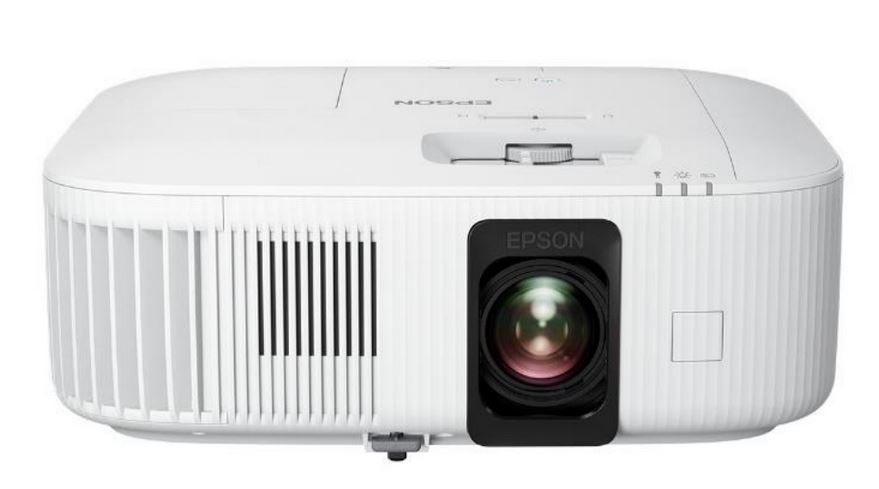 |
| Source: Epson. The new EH-TW6250 Smart Gaming Projector is designed for movie nights and casual gaming. |
Users can connect accessories to the HDMI ARC port, or via Bluetooth with the use of the Epson ELPAP12 Android TV Dongle.
“Epson’s new EH-TW6250 Smart Gaming Projector allows more users to experience the bright and vivid images made possible with our 4K PRO-UHD technology at a more accessible price point,” said Derek Tan, Head of Sales and Marketing, Epson Singapore.
“We believe that users will truly be able to elevate their home entertainment experience with this flexible and easy-to-install all-in-one offering.”
Details
The EH-TW6250 Smart Gaming Projector will be available in Singapore starting 9 March 2023. Visit the website or contact your nearest Epson Authorised Dealers for more information.
*Input lag of 20 ms and under requires users to activate FAST mode.

4 January 2020
Singapore Expo CNY Fair gives discounts of S$380 to the first 888 customers daily
- Items offered at up to 88% off-
The Singapore Expo CNY Fair will be giving out free lucky anbaos g pows worth S$380 each to the first 888 customers per day from 10 to 12 January. The event will take place at Singapore Expo Hall 6 from 12 pm to 9 pm daily.
Customers may use the vouchers in the angbaos to purchase electronics appliances. The discount is applied on top of promotional prices that are up to 88% off. Brands such as Apple, Acer, Bosch, Electrolux, Hitachi, Kadeka, Karcher, LG, Mitsubishi, Philips, Samsung, Sharp Panasonic, 707 and more will be at the fair.
 |
| Source: Singapore Expo CNY Fair. Part of the brochure showing offers for home entertainment. |
Details:
One angbao will be given out per person, for the first 888 customers per day. Interested customers are required to RSVP online and redeem their angbaos at the fair between 10-12 January 2020. Each S$380 lucky angbao consists of the following discounts:
|
Date: 10 – 12 January 2020
Venue: Singapore Expo Hall 6
Opening hours: 12 pm – 9 pm
*Terms and conditions: While stocks last. The vouchers cannot be used for specific items. Check the event brochures for more information.
27 April 2018
Securing home networks is important when employees work from home
The issues include:
· Default or weak passwords in use, as these are low-hanging fruit for hackers.
· Not keeping up with firmware updates, creating vulnerabilities.
Routers and other devices are also being leveraged for mining Bitcoin and other cryptocurrencies, which Trend Micro calls "the most detected network event seen in 2017". Besides routers, devices found mining cryptocurrency included home computers (14,586), tablets (358), smartphones (981), game consoles (314), IP cameras (573) and printers (219).
"Cryptocurrency-mining malware, for instance, are capable of infecting devices to illicitly mine for cryptocurrency," Trend Micro researchers noted in the report. "Such malware can spread the same way other malware types spread, e.g., through spam emails and malicious URLs, and take advantage of the computing power of multiple devices to increase yield from mining."
Another threat comes through Remote Desktop Protocol (RDP) capabilities in devices, which hackers are using to carry out brute force logins of devices operating outside the office. RDP technology allows someone to take control of a device remotely. While it is meant to be used for maintenance and troubleshooting, hackers can also use RDP to execute malware that could eventually spread to enterprise networks; steal user details, and find out who has control of what devices. Those with more privileges may then be targeted for a wider network attack.
 |
| Source: Trend Micro. Network diagram above a tablet. |
In one real-word instance, an employee took his work laptop home, where his daughter used the device to check her email. One infected message that she opened contained Sircam, which infected the laptop and then the corporate network after the laptop was brought back to the office.
Luckily for the employee and the small business he worked for, the infection was spotted on the company network and systems were disconnected before it could spread further or damage machines. The instance did result in downtime for the company, during which the network had to be cleansed and employees were unable to access mission-critical assets.
Explore:
28 March 2017
Home networks need to be more secure
“Recent Internet of Things (IoT) -based attacks have revealed the sheer volume and ease by which billions of connected devices can be weaponised and used to disrupt the digital economies of entire countries and millions of users. These issues are compounded by the lack of basic security features and management capabilities in many IoT devices,” said Peerapong Jongvibool, VP, Southeast Asia and Hong Kong, Fortinet.
“As our work and social networks expand into the home, so does the potential threat footprint. With more employees working from home, corporate offices are being regularly linked to these hyper-connected and often poorly secured home networks. It is critical that we take a fresh look at how we are protecting ourselves from the growing number of networks we interact with.”
Sensitive personal, financial and medical information, as well as work assets are all at risk from increasingly sophisticated malware and financially motivated cybercriminals, Fortinet says.
According to market research firm IDC, there will be nearly 9 billion connected devices across Asia Pacific by 2020. Connected devices on the home network range from smart TVs, entertainment and gaming systems, smart refrigerators, to online home security systems. Many home networks also include wireless medical devices, and tools designed to track and monitor children or elderly family members. All of these devices are connected to the Internet through a home Wi-Fi system, or increasingly, a home area network (HAN) combined with network-attached storage (NAS) and cloud-based applications that are accessible from any device, anywhere.
Fortinet proposes three strategies for home users to secure increasingly complex home networks:
1. Learn
With the increasing number of portable IoT and other devices installed or used at home, it may be difficult to know exactly what is on the home network at any given time. Even harder is controlling what they are allowed to do. There are a number of security tools specifically designed for the home which can identify devices looking to connect to the Internet through Wi-Fi network. Many of them can be easily configured to provide them with access to the guest network, while restricting and monitoring the kind of traffic they are generating.
Before purchasing a device that wants to connect to the network, ask some questions. Not every device that wants to connect to the network needs to.
Next, research these devices with an eye towards security. Many connected devices include vulnerable software or backdoors that make them potential targets. And far too many of these devices cannot be hardened, patched, or updated.
2. Segment
Home owners can apply a network segmentation strategy to protect their resources.
Buy separate wireless access points for separate uses, like gaming systems and IoT devices versus PCs and laptops.
Set up a wireless guest network for visitors or new devices. Most access points allow users to restrict access, set up things like firewalls, and monitor guest behaviour.
Consider purchasing a separate, inexpensive device that is only used for sensitive tasks like online banking. Users could also set up a separate virtual device on their laptop or PC for banking online to protect their critical resources.
Keep work and personal devices separated. Set up a separate connection for work, only connect through a VPN tunnel, and consider encrypting sensitive data travelling back and forth between home and corporate networks.
3. Protect
Home networks and devices tend to become infected because security is notoriously lax.
Keep a list of all the devices and critical applications on your network, including the manufacturer. Set up a weekly routine to check for updates for physical and virtual devices, operating systems, applications, and browsers.
Get antivirus and anti-malware software, keep them updated, and run scans regularly. Remember that no software is 100% effective, so set up a regular schedule, say once a month, where a second or third security solution is used to scan devices or networks. Many solutions provide a free online version or let users run a free trial or demo version for a period of time.
Get a firewall. Most home security packages include a firewall option. Turn it on. Even the default settings are better than doing nothing.
Use good password hygiene. Change your passwords every three to six months. Use a password manager to store passwords. Use different passwords for different kinds of things. Do not mix personal and work passwords.
Password managers have been developed to help manage passwords, and all that is needed is to keep track of a single master password. This technology will also automatically create strong random passwords for each application, and store them in an encrypted format.
“Given the rate at which technology is changing, users can no longer afford to simply load an antivirus tool onto their laptop and think they are going to be protected. As users begin to use and interconnect more and more devices, and blend their personal, social, and work lives, security is increasingly important,” said Jongvibool. “It is critical that users begin to develop a strategy now for learning, segmenting, and protecting their network, resources, data, and privacy.”
18 August 2016
StarHub brings 12GB mobile data bundles back, and more
SurfHub from StarHub bundles two StarHub services – a 4G mobile postpaid line with at least 12GB of data and a 1Gbps fibre home broadband subscription – from S$96.56 monthly over 24 months. This is about half of what customers pay for a standalone 12GB mobile plan. As part of SurfHub, customers will also get up to 700mins of local talktime and 1,500 local SMS/MMS as well as a mobile handset subsidy.
“We know customers miss the freedom that huge data bundles offer and wish they were as affordable as before. Faster 4G technologies have catalysed the adoption of data-intensive services, and our customers are now sharing more and watching for longer on their smartphones. With SurfHub, we want to continue giving our Hubbing customers the best value, which is what StarHub is known for,” said Wang Li-Na, Head of Product & Marketing, StarHub.
SurfHub customers can also get 50% discount on selected complementary services, such as International Roaming for more affordable roaming overseas, 2-in-1 LINE for hosting two numbers on one SIM, or MultiSIM for multi-device sharing using one mobile number.
SurfHub customers can also enjoy StarHub Go Select online streaming service at half the price for 12 months. For an additional S$4.95 per month (usual monthly rate: S$9.90), the Go Select pack offers customers unlimited viewing of content such as the best in US and British productions, Asian dramas and variety shows, and documentaries on mobiles, tablets or laptops. Customers can stream StarHub Go content on their StarHub Mobile postpaid line without incurring mobile data charges.
Together with the launch of SurfHub, StarHub is enhancing its five-services-in-one pack HomeHub Go by more than doubling its mobile data bundle to 15GB. HomeHub Go 1Gbps customers can get up to 30% Hub Club discounts on additional 15GB mobile lines (usual monthly rate: S$70 per line). The four other services are 1Gbps fibre home broadband, 21Mbps mobile broadband, up to 77 channels on fibre TV and a home phone line.
Interested?
24-month plans
SurfHub 12 will cost S$96.56 monthly, and includes 12GB of mobile data, 150 minutes of talk time and 1,000 SMS/MMS messages
SurfHub 15 will cost S$116.56 monthly and includes 15GB of mobile data, 350 minutes of talk time and 1,200 SMS/MMS messages
SurfHub 18 will cost S$136.56 a month and includes 18 GB of mobile data, 450 minutes of talk time and 1,300 SMS/MMS messages
SurfHub 24 is S$156.56 a month and comes with 24GB of mobile data, 700 minutes of talk time and 1,500 SMS/MMS messages
All plans include 1Gbps fibre broadband for the home and a number of discounts:
50% off StarHub Go Select online streaming service (12 months)
50% off International Roaming (24 months)
50% off MultiSIM or 2-in-1 LINE
Free wireless AC dual-band router
Free fibre termination point installation
Free broadband installation and activation
Both SurfHub and HomeHub Go 1Gbps are available for signup starting today at all StarHub Shops and authorised dealers.
8 February 2016
Singtel ups max speeds on fibre broadband for home offices
Goh Seow Eng, MD, Home, Consumer Singapore, Singtel, said, “We made a commitment to our customers to bring them the best network innovations, the very latest technologies for work and play. We recognise that residential customers are using greater bandwidth and requiring faster speeds for their online activities.”
Through a dedicated, ultra-high-speed 10Gbps wired connection*, users will be able to download and stream at larger volumes of data. The service, which also features four 1Gbps ports, can serve as a home networking solution for multi-user environments such as home offices and large households. This will enable individuals working from home to conduct multiple videoconferences, file transfer sessions and even run a home business without compromising on connectivity and bandwidth.
To enhance their 10Gbps experience, customers can set up Singtel’s latest WiFi Mesh to improve wireless performance and connectivity in their homes. WiFi Mesh ensures consistent bandwidth at high speeds and increased coverage, providing robust wireless connectivity for data-demanding applications.
Interested?
Singtel’s 10Gbps Fibre Home Bundle** is priced at S$189/month and includes a 10G optical network router, a wireless Dual-Band AC router, NetLink Trust installation and Singtel weekday installation, a 4G Mobile Broadband 500MB subscription, and for a limited period, a pair of WiFi Mesh devices worth S$240. Customers can register their interest up to 15 February.
System Requirements***,****
|
End User Macintosh
|
PC
|
Processor
|
Core i7 minimum
|
Core i7-4790K minimum
|
System Memory
|
8GB RAM minimum
|
8GB RAM minimum
|
Hard disk
|
SSD
|
SSD, PCI-E interface
|
OS
|
Mac OS X
|
Windows 7, Windows 8.1, Windows 10
|
Cable
|
Cat6/6a cable
|
Cat6/6a cable
|
Required connection port
|
10 Gigabit Ethernet port (10GBase-T) network card or Thunderbolt 2 to 10 Gigabit Ethernet adapter (e.g. SANLink2)
|
10 Gigabit Ethernet port (10GBase-T) network card
|
**Plan comes with 24-month contract. Terms and conditions apply.
***Customers can connect a 10 Gigabit switch to the 10GbE optical network router (ONR) port available to share connection to more 10GbE computers or network attached storage (NAS) devices
****Customers can utilise the ONR 4x1GbE to distribute bandwidth to multiple rooms with any existing Gigabit Ethernet enabled devices/computers/WiFi routers
13 December 2015
Philips EyeCare connected desk lamp works with Xiaomi smartphones to deliver optimum lighting
 |
| Source: Philips. |
Liu De, Co-Founder and Vice President of Xiaomi, said, “We’re glad to collaborate with Philips, the world’s leader in lighting, who launched this innovative connected desk lamp in the online store of Xiaomi. This lamp can seamlessly connect with Xiaomi’s smart home ecosystem, creating a superb experience for our users. We believe this collaboration between the two strong companies is sure to improve the attraction of Xiaomi’s smart home platform, as well as its user experience.”
By using Philips Advanced Optical Lens Technology, the Philips EyeCare connected desk lamp reduces glare; and by using the Xiaomi Smart Home app users can adjust to the correct level of illumination needed, preventing unnecessary eye strain. It also eliminates light shining directly into the eyes with even light distribution. The result is less eye strain without any compromise on light quality.
Furthermore, the Philips EyeCare connected desk lamp can connect with other Xiaomi smart home devices through the cloud. The Philips EyeCare connected desk lamp can connect to Xiaomi door sensors and body sensors to deliver dynamic new lighting experiences at home.
Philips EyeCare connected desk lamp will be available via Xiaomi's online retailing platform Mi Store from January 2016. It supports smartphones operating on Android 4.0 and iOS 7.0 and their upgraded versions.
*2012 Fudan University ENT Hospital on best light recipes for young adults.
4 May 2015
Singtel introduces affordable roaming for Australia
 |
| Source: Singtel. |
According to Singtel, the DataRoam Saver Australia (Monthly) 1 GB plan is the most affordable plan of its kind. It follows from the successful DataRoam Saver Malaysia (Monthly) 1 GB plan, launched last October. The new plan offers network coverage in Australia through wholly owned subsidiary Optus. Singtel customers roaming on Optus’ network will be connected to its 4G Plus mobile network and enjoy faster uploads and downloads for a better data experience while on the go.
“Australia is a popular travel destination among Singaporeans and with our new plan, Singtel customers will be served by a high quality network and enjoy seamless connectivity. They will not have to rely on Wi-Fi hotspots or go through the hassle of registering for a local SIM to be connected again,” said Johan Buse, Singtel’s VP for Consumer Marketing. “Business travellers can also stay in touch with the office and clients while on the move.”
The DataRoam Saver Australia (Monthly) 1 GB plan also features Network Lock* and data roaming usage alerts - complementary services that give customers useful information about their data usage, and prevent data roaming bill shock.
Customers can subscribe to Singtel’s Roam Like Home DataRoam Saver Australia (Monthly) 1 GB and DataRoam Saver Malaysia (Monthly) 1 GB plans via the My Singtel App or by dialling *100# while in Australia or Malaysia**.
*Network Lock protects DataRoam Saver plan subscribers from unintended pay-per-use data charges on non-preferred networks
**Customers can subscribe to the plan via the following channels:
My Singtel app
Dialling *100# in Australia or Malaysia
Dialling *7626 in Singapore or SMS *7626 to 3333 while overseas. Roaming SMS charges will apply.
Singtel retail shops or Singtel exclusive retailers
12 January 2015
Corporates can participate in For a Golden Home charity campaign
 |
| Source: Cromly.com. Companies can pledge a project to help raise funds for the charity campaign. Eunice Olsen and Paul Foster are For a Golden Home ambassadors. |
The website will go live on 3 February, a Tuesday, in support of the Giving Tuesday movement, and will close two months later in March. Funds raised will be fully channelled towards restoring basic living conditions for the occupants of approximately 30 one-room flats through Project HomeWorks by Habitat for Humanity.
Through an invitation to pledge, an organisation can take ownership of its own fundraising project, with its own goals and means to do so. Suggested pledges include pledging corporate fundraising efforts towards a particular target, or pledging a percentage of corporate profits, for a certain period.
Corporate sponsorships are also available, through matching donations dollar-for-dollar to a specific maximum amount, or sponsorship-in-kind of meaningful incentives to encourage donors.
Email alexa@cromly.com for more information about corporate partnerships.