Showing posts with label malware. Show all posts

8 September 2025

Viruses, Trojans still infecting our computers

Source: Surfshark Antivirus. Chart. PowerShell scripts dominate Windows malware, whereas viruses are the leading cause of malware for macOS.PowerShell scripts dominate Windows malware, whereas viruses are the leading cause of malware for macOS.
Source: Surfshark Antivirus. PowerShell scripts dominate Windows malware, whereas viruses are the leading cause of malware for macOS.

Malware remains one of the main ways criminals steal money or data from people and companies. So far in 2025, Surfshark Antivirus has recorded 479K malware cases. Of these, 87% (419K) were on Windows, and the remaining 13% (60K) were on macOS. 

- Malware can cause extensive harm to internet users. Personal data breaches alone caused users US$1.5 B in losses in 2024.  

- Attackers are focusing their efforts on Windows since it holds the majority market share and therefore the biggest catch. 

Windows remains the most popular operating system (OS) worldwide, although its market share declined from 77% in 2020 to 71% in 2025. The second most popular OS is macOS, with a stable global market share of around 15%. For example, the OS breakdown in South Korea is Windows 85%, and macOS 6%. 

- PowerShell script malware is among the most common (22%) Windows infections, Surfshark said, giving hackers full control of a computer and its data; 

“PowerShell scripts are among the most common Windows malware and the most dangerous for users. They can give hackers full control of your computer and data. These scripts blend in, appearing like legitimate software operations. 

"For example, you might be browsing your favourite news site when a popup appears, saying: ‘Your system needs an urgent security update — click here.’ The pop-up shows the Windows logo and looks official, so you select ‘Update Now.’ Yet the ‘update’ actually uses a PowerShell script to install malware and connect to a hacker’s server. That’s how all your private data, including passwords and financial information, can become accessible to hackers,” explained cybersecurity expert Nedas Kazlauskas. 

- Mac users are most likely to catch viruses (28%) and Trojans (26%)

Viruses and Trojans exploit vulnerabilities in macOS. Most often, they are installed after downloading apps from outside the official App Store. Mac viruses and Trojans can also include browser-hijacking programs that attempt to steal users’ browser data, such as saved passwords in password managers.

Additionally, Surfshark’s expert draws macOS users’ attention to the “Other” malware category, which accounts for 16% of attack cases. “Hackers are experimenting extensively with macOS. They are searching for vulnerabilities and trying to install malicious programs. What makes it tricky is that it’s not really clear what their final goal is,” said  Kazlauskas.

Surfshark suggests:

- Have a working antivirus program. Regular virus scans are vital for detecting and eliminating harmful code; 

- Always update your operating system and apps. Unpatched devices are the easiest target for malware, but be cautious of pop-up windows that tell you to update or download software;

- Don’t open suspicious emails, attachments, or links. In most cases, phishing attempts lead to device infections; 

- Beware of suspicious links, particularly shortened ones circulating on social media. Usually, those lead to phishing or malware websites where personal data could be at much higher risk; 

- Use public Wi-Fi carefully. Avoid accessing sensitive accounts or data on unsecured networks.

9 November 2017

Could your computer be making someone else rich?

Fortinet, the global player in high-performance cybersecurity solutions, has issued an advisory to users to check their computers if they feel that the devices are acutely slowing down. They could unwittingly be donating computing power to cybercriminals who are "browser cryptojacking".

Fortinet’s FortiGuard Labs researchers have been discovering more and more of such incidents, which are essentially a new trick used to stealthily mine Monero cryptocurrency using stolen CPU resources, the company said. This is done by loading a rogue script into the web browser. The script contains a unique site key that works to enrich cybercriminals with Monero currency every time they visit certain websites.

Browser cryptojacking was discovered last September when a new technology to mine Monero cryptocurrency within web browsers surfaced. The script was written in JavaScript and is easily embedded into any web page. Once a computer user visits compromised pages, their computing power is hijacked for mining the currency*. The more time users spend on such web pages, the more CPU cycles can be consumed. Hackers typically pick illicit video streaming web sites, where people stay for hours watching movies or TV serials, to plant such scripts.

Back-of-the-envelope calculations by security researchers show that cryptojacking can be lucrative − hackers targeting popular illicit sites like The Pirate Bay can earn up to US$12,000 per month.

Fortinet advises that if users hear computer fans running at full speed without any apparent reason, they can check their CPU usage. Go to Task Manager on Microsoft Windows by pressing the [Ctrl]+[Shift]+[Esc] buttons at the same time, or Activity Monitor on the Mac, and Top at the Linux command line.

The above commands will list all the processes running on the computer, allowing users to find the culprit (usually the web browser, e.g. Google Chrome) by ranking which process or software has the highest CPU consumption. Once identified, stop the culprit by right-clicking on the process and selecting “end task”, “kill” or “terminate” respectively. This ends your current connection to the compromised website. After that, users can reopen their browsers and visit other sites without problems.

The next step is to prevent your computer from being cryptojacked again. Install an anti-adware web browser extension, as well as web filtering and antivirus tools on your computer, and keep these updated. Fortinet also advises users to refrain from visiting illicit sites.

“When using computing devices, it pays to always be situationally aware and look out for anomalous things, be it your fan speeding up or an email offering something too good to be true,” said David Maciejak, Director of Security Research, Fortinet. “Cyberspace is a perilous place full of schemers trying to take advantage of the gullible. Deploying the right security tools to protect yourself will help, but being cautious and thinking twice before taking any action will also go a long way in preserving your money, confidential data and computing experience.”

*This refers to making complex mathematical calculations that satisfy certain rules to successfully "discover" a unit of cryptocurrency. Each computer that helps to make the calculations is assigned a unique serial number and is entitled to a share of that unit. Many attempts have to be made to mine cryptocurrency successfully, ensuring its scarcity.

20 April 2017

Android malware that has many faces, escaping detection

ESET researchers have discovered another banking trojan on Google Play – this time disguised as a Flashlight widget and targeting a potentially unlimited number of apps. Based on code that was primarily used for ransomware, the attackers are now trying their luck with phishing for banking credentials, ESET resaerchers said.

Android users were the target of another banking malware with screen locking capabilities, masquerading as a flashlight app on Google Play. Unlike other banking trojans with a static set of targeted banking apps, this trojan is able to dynamically adjust its functionality.

Aside from delivering promised flashlight functionality, the remotely controlled trojan comes with a variety of additional functions aimed at stealing victims’ banking credentials. Based on commands from its command and control (C&C) server, the trojan can display fake screens mimicking legitimate apps, lock infected devices to hide fraudulent activity, intercept SMS messages and display fake notifications in order to bypass two factor authentication.

The malware can affect all versions of Android. Because of its dynamic nature, there might be no limit to targeted apps – the malware obtains HTML code based on apps installed on the victim’s device and uses the code to overlay the apps with fake screens after they are launched. ESET researchers have seen fake screens for Commonwealth Bank, National Australia Bank and Westpac Mobile Banking, but also for Facebook, WhatsApp, Instagram and Google Play.

The trojan, detected by ESET as Trojan.Android/Charger.B, was uploaded to Google Play on March 30 and was installed by up to 5,000 unsuspecting users before being pulled from the store on ESET’s notice on April 10.

Those who have downloaded a flashlight app recently can check in Settings > Application Manager/Apps >  to see if they have the Flashlight Widget. The app cannot be uninstalled conventionally, but only if the device is first booted in Safe mode.

ESET advises users to stick to official app stores when downloading apps, and downloading apps which are popular going by the number of installs, ratings and review content. ESET also says that if an app asks for permissions that are unusual for its function – like device administrator rights for a Flashlight app – to rethink the download. Last but not least, use a reputable mobile security solution.

14 March 2017

Google Play apps may not be what they seem

Source: ESET. Rogue apps.
Researchers at ESET, a global player in proactive cybersecurity, have discovered 13 new Instagram credential stealers on the Google Play store. While they appear to have originated in Turkey, some apps used English localisation to target Instagram users worldwide. Altogether, the malicious apps have been installed by up to 1.5 million users.

According to ESET, the new credential-stealing apps appeared on the official Google Play store as tools for either managing or boosting the number of Instagram followers. To lure users into downloading, the apps promised to rapidly increase the number of followers, likes and comments on one's Instagram account. Detected under the name Android/Spy.Inazigram, the malicious applications were phishing for Instagram credentials and sending them to a remote server. The compromised accounts can be used to spread spam, ads, and raise follower counts of other users.

For example, one of the apps named Instagram Followers requires the user to log in via an Instagram lookalike screen. The credentials entered into the form are then sent to the attackers' server in plain text. After having entered the credentials, the user will find it impossible to log in, as explained in an "incorrect password" error screen.

The error screen also features a note suggesting the user visits Instagram's official website and verifies their account in order to sign in to the third-party app. As the victims are notified about unauthorised attempt to log in on their behalf and prompted to verify their account as soon as they open Instagram, the note aims to lower their suspicion in advance.

According to ESET, victims can tell if their accounts have been compromised if they see an unfamiliar icon under their installed applications. They will also have seen a notice from Instagram about someone attempting to log into their accounts. Finally, their Instagram accounts might appear to have increased following and follower numbers, and experience replies to comments that they have never posted.

ESET suggests that victims uninstall the unfamiliar apps or use a reliable mobile security solution to remove the threats. They should also change your Instagram password immediately, as well as wherever the same password is used. ESET recommends using a different password on each of their accounts. 

ESET also advises users to use a mobile security solution, and stick to popular apps marked as Top Developer or found in the Editor's Choice category. While developers may appear popular going by the number of installs, ratings and the content of reviews, ratings and reviews are not always reliable.

Upon ESET's notification, all 13 apps have been removed from the store.

7 February 2017

One in five computers in Singapore encountered malware in Q216

Source: Microsoft website. Graphic for the SIR page.
Findings from the Microsoft Security Intelligence Report (SIR), Volume 21, show that one in five computers in Singapore running Microsoft real-time security products reported a malware encounter in Q216.

The Microsoft SIR is a twice-yearly report that provides unique insights into the threat landscape to help organisations learn about trend data in industry vulnerabilities, exploits, malware and web-based attacks. The latest report also identified Asia Pacific markets, especially the emerging ones, as among those at the highest risk of cybersecurity threats with three out of the top five global spots for rate of malware encounters in the region. Volume 21 covers threat data from 1H16, based on analysis of threat information from over a billion systems worldwide. Also included are longer term trend data and detailed threat profiles for over 100 individual markets and regions.

Singapore, as with markets in Asia Pacific with higher levels of IT maturity such as Australia, Hong Kong, Japan, New Zealand and South Korea, displayed malware encounter rates that are below the worldwide average. In particular, malware encounter rates in Singapore during Q216 stood at 19.4%, almost two percentage points lower than the worldwide average.

When compared with countries such as Vietnam and Indonesia, where the malware encounter rate is more than 45% in Q216, these numbers highlighted the diverse cybersecurity landscape in the region. With a malware encounter rate that is more than double the worldwide average of over 21% during the same period, Vietnam and Indonesia are also among the top five locations across the globe most at risk of infection.

Some of the key regional and Singapore findings from the Microsoft SIR, Volume 21 include:

The top markets in the Asia Pacific under threat from malware are:
  • Mongolia
  • Vietnam
  • Pakistan 
  • Indonesia
  • Nepal and Bangladesh
The most-encountered malicious software categories in Singapore include:
  • Trojans, the most common type of malware that relies on the user to run them on your PC by mistake, or to visit a malicious web page.
  • Worms, a type of malware that spreads by copying themselves to other PCs through a PC network by exploiting security vulnerabilities.
  • Downloaders and droppers, a type of malware that installs other malicious files, including malware, onto the PC. It can download the files from a remote PC or install them directly from code that is included in its own file.

The report showed that the top most encountered malicious software families in Singapore include:
  • Dynamer, a Trojan which can steal personal information, download more malware or give hackers access to computers.
  • Spursint, a Trojan which can steal personal information, download more malware or give hackers access to computers.
  • Xadupi, a Trojan that is often installed by Sasquor or Suptab under the name WinZipper, QkSee or both, posing as a useful application but which silently downloads and installs other malware.

Keshav Dhakad, Regional Director, Digital Crimes Unit (DCU), Microsoft Asia, said, “With increasing malware encounters and sophistication of cyberattacks, cybersecurity is becoming a mission critical priority for most organisations. It generally takes an average up to 200 days for organisations to find out that they have been breached. With no sign of abatement in the future, what companies need is a secure modern enterprise posture, which involves well-integrated 'Protect-Detect-Respond' investments and capabilities, with a strategic focus on the core pillars – identity, apps, data, infrastructure and devices.

"Additionally, organisations should also strongly consider adopting trusted cloud-based services to enjoy the highest levels of data protection, leveraging the cloud provider’s enterprise-grade security and privacy expertise, assurances and certifications.”

Security teams should also keep abreast of changes in the threat landscape brought about by the emergence of cloud computing. The latest report contains an expanded Featured Intelligence section that includes a deep dive section titled Protecting cloud infrastructure: detecting and mitigating threats using Azure Security Center. This section details new threats that organisations may encounter and explains how they can use Azure Security Center to protect, detect, and respond to security threats against Azure cloud-based resources.

Some of the new cloud-targeted threats outlined are:
  • Pivot back attacks, which occur when an attacker compromises a public cloud resource to obtain information that they then use to attack the resource provider’s on-premises environment
  • 'Man in the cloud' attacks, in which an attacker induces a prospective victim to install a piece of malware using a typical mechanism, such as an email with a link to a malicious website. It then switches out the user’s cloud storage synchronisation token with the attacker’s token, allowing the attacker to receive copies of each file the user places in cloud storage. This effectively makes the attacker a 'man in the middle' for cloud storage.
  • Side-channel attacks, where an attacker attempts to put a virtual machine on the same physical server as the intended victim. If he succeeds, the attacker will be able to launch local attacks against the victim. These attacks might include local distributed denial of service (DDoS), network sniffing, and man-in-the-middle attacks, all of which can be used to extract information.
  • Resource ransom, where attackers hold cloud resource hostage by breaking into and controlling public cloud account, and then requiring the victim to pay a ransom to release encrypted or restricted resources.

Organisations need to ensure they have a robust cybersecurity posture to withstand and respond effectively to most cyberattacks and malware infections. Five best practices for improving defence against cybersecurity threats are:
  1. Use only genuine, current and updated software. The usage of IT assets which are old, unprotected, or are non-genuine in nature, substantially increase the chances for a cyberattack. For example, pirated and counterfeit software are known to come with embedded malware infections.
  2. Poor cyber hygiene of IT users, negligent employee behaviour or weak credentials/password protection within an organisation, adds a high degree of vulnerability for system compromise. With more and more personal devices being used at the workplace, the higher the chance they are infected.
  3. Develop a big data analytics culture involving data classification, multifactor authentication, encryption, rights management, machine learning for behavioural analytics and log analytics to spot user anomalies and irregular or suspicious patterns, which could provide potential clues in advance to prevent impending or ongoing security breaches.
  4. Invest in trusted security solutions and modern threat protection technologies to monitor, detect and remove common and advanced cyber threats in real time, while developing in-house expertise to undertake threat analytics.
  5. Be comprehensive on all aspects of cybersecurity, not just technology. Have a IT trusted supply chain across cloud, software, hardware, Internet of Things, BYOD (bring your own device) and regularly review and assess cybersecurity investments and performance of both software and hardware deployment, including customer and vendor access to the corporate network.

Interested?

Download the Microsoft SIR, Volume 21 report

22 July 2016

Ransomware is nasty, nasty business

Ransomware has achieved a revival, and it has come back stronger, says Trend Micro.

Today, ransomware not only locks a victim’s computer or mobile phone, but also encrypts the data stolen. This makes sure that even if the victim is able to remove the ransomware, the encrypted files remain inaccessible without paying for the decryption key.

In the first five months of 2016 (from January to May), Trend Micro blocked 66 million ransomware attacks globally, 10 million in the Asia Pacific region (APAC). In addition, the company has discovered at least 50 new types of ransomware.

Source: Trend Micro. Ransomware facts and figures. The market rate for ransoms is currently between half to 5 Bitcoins.


Source: Trend Micro. Ransomware facts and figures. A Bitcoin cost around US$643 at the time the infographic was created, and US$659 at the time of writing. This puts 5 Bitcoins at US$3,295 today.

19 July 2016

Check Point shows how apps can be turned into Android malware

Source: Check Point blog. Watch the video.

Getting the Pokemon GO app from unofficial sources can lead to malicious app downloads, Check Point has warned.

In a video, Check Point explains how cybercriminals can repackage the Pokemon GO app for Android, turning it into malware that can steal sensitive information or spy on the unsuspecting user.


The company advises gamers to download apps that can detect and stop such repackaged malware.

Interested?
 
The official Pokemon Go app can be downloaded from the Google Play Store or the Apple App store, or via the official website.

Hashtag: #PokemonGo

14 June 2016

Microsoft Malware Infection Index 2016 shows emerging Asia at risk from malware

The Asia Pacific heat map shows which countries are most affected by malware (darker colours), and which are least affected (lighter colours).

Microsoft has launched its Malware Infection Index 2016* (MII2016), which has found that the top three most-encountered malware are the Gamarue computer worm, and trojans Skeeyah and Peals.

Gamarue can give a hacker control of the victim's PC while trojans can steal personal information, download more malware or give hackers access to a PC. It is commonly distributed via exploit kits and social engineering - spam email for example, and has been observed to steal information from the local computer, then communicate with servers managed by attackers. According to the MII2016 Gamarue is prevalent in ASEAN and was the third-most commonly-encountered malware family worldwide in 2H15. Indonesia reported Gamarue encounter rates of over 20% in Q415, close to the global encounter rates for all threat families combined for the quarter. In Mongolia, 35 out of every 1,000 computers running the Microsoft Malicious Software Removal Tool were infected with Gamarue in 2H15.

Trojan encounters grew 57% from Q215 to Q315, particularly due to Peals and Skeeyah. Both have been observed to download and install other malware, use the victim's computer for click fraud, steal information on the PC and give access to the device to hackers. Peals in particular corrupts important system files and causes applications to malfunction.

Keshav Dhakad, Regional Director, Intellectual Property & Digital Crimes Unit, Microsoft Asia disclosed that IP addresses are now being hard-coded into malware, so that rather than hit any destination, they are more like a laser-guided missile that "will only hit a particular target until it gets through".

Further, the Index has found that four of the top five locations worldwide most at risk of infection are from the Asia Pacific region: Pakistan, Indonesia, Bangladesh, and Nepal, ranked first, second, fourth and fifth respectively in terms of the number of computers encountering malware. There is even a dedicated group of cyber criminals, dubbed PLATINUM by the Microsoft Windows Defender Advanced Threat Hunting team, which has been targeting government agencies, defense institutes, intelligence agencies and telcos in South and Southeast Asia since 2009.

The MII2016 reports that the top 20 Asia Pacific markets under malware threats are:

Pakistan
Indonesia
Bangladesh
Nepal
Vietnam
Philippines
Cambodia
India
Sri Lanka
Thailand
Malaysia
Singapore
Taiwan
Mainland China
Hong Kong
Australia/Korea
New Zealand
Japan

Each of the top five countries had close to 40% or more computers which encounter malware compared to the worldwide average of 20.8% as of Q415. This number is up from 17.6% in Q115.

Dhakad said, "The rising sophistication and targeted cyberattacks are causing devastating disruption and losses of data and information across all computer and Internet user segments. In fact it generally takes on average up to 200 days for organisations to find out that they have been victims of cyberattacks.

"We are noticing four key common IT environment issues. Firstly, the usage of IT assets which are old, unprotected or are non-genuine in nature. Secondly, unmanaged and unregulated IT assets usage, procurement and maintenance. Thirdly, poor cyberhygiene of users and negligent employee behaviour inside companies. Fourthly, the inability of the companies to timely monitor, detect and remove modern cyber threats, among others, are some of the common clauses for cybercrime risks."

Dhakad advised enterprises to:

Go for strong fundamentals - use only genuine, current and updated software.

Have a robust cyber defense ecosystem, not just free tools.

Focus on cyberhygiene so employees are aware of safer Internet practices and internal IT policies. "A lot of times cyberhygiene alone can cripple," he warned. "It is everyone's responsibility."

Assess, review and audit often, not annually. Include suppliers, vendors and customers as well.

A data culture is imperative. Everything requires different levels of protection - know what data is important, who is accessing the data. Encryption and multifactor authentication are a must.

Opt for the cloud as a next-generation cybersecurity and data protection.

Hashtags: #CyberTrustAPAC, #Trustintech

*The findings are based on data from the Microsoft Malware Protection Center (MMPC) and the Microsoft Security Intelligence Report (SIRv20).

17 May 2016

Sophos Clean eliminates malware intelligently

Sophos, a global player in network and endpoint security, has launched Sophos Clean, the latest addition to its enduser protection portfolio of malware detection, remediation and removal software. The signature-less technology uses progressive behaviour analytics, forensics and collective intelligence to discover and remove code from zero-day threats, Trojans, rootkits, polymorphic malware, irritating cookies, spyware and adware.

Built on technology acquired from SurfRight in December 2015, Sophos Clean represents the next generation of malware detection and removal tools that can detect known and unknown threats. The on-demand scan does not need to be installed, which is particularly useful in cases of ransomware infection or in situations where malware is manipulating installed security software.

“The need for next-generation endpoint protection that doesn’t rely on signatures is long established. Zero-day threats and some ransomware like Cryptolocker can only be detected by the integrated capabilities of exploit prevention, behaviour analytics and pre-execution heuristics built into our endpoint protection software today,” commented Dan Schiappa, GM and SVP for Enduser Security at Sophos. “Sophos Clean can complement any installed anti-malware software by providing a second opinion on suspected files. With a minimal footprint and fast scan, Sophos Clean will quickly identify and remove all residual traces of malware.”

Resilient malware attacks critical system files or boot records to manipulate Windows and antivirus software - even before the operating system boots. Sophos Clean can remove persistent threats from within the operating system and replaces infected Windows resources with safe original versions. Reinfection attempts are proactively blocked until threat remediation has finished.

“Today’s malware is persistent by design: difficult to detect, difficult to remove and difficult to recover from,” commented Simon Reed, VP of SophosLabs. “Our researchers are seeing an ever increasing sophistication of malware, both the techniques being used and the heavy use of automation.

"Polymorphism is becoming the norm, and previously unknown malware is on the rise. These attacks, once active on your system, embed themselves deeply using multiple techniques to ensure long-term persistence. Using the latest removal technology, Sophos Clean is able to remove all fragments of a malware infection and return the system to a pristine state.”

Sophos Clean is an on-demand malware scanner of just 11 MB and can be started directly from a USB flash drive, CD/DVD or network attached storage device. The tool can scan and remediate without leaving a footprint on the local system. A typical scan with Sophos Clean takes less than five minutes because it can immediately distinguish safe applications from malicious software through advanced behaviour analysis and verification of content with a database of trusted applications. This also dramatically reduces the instances of false-positives, which some other signature-less malware detection tools have struggled to achieve.

Key features:

· Next-generation, signature-less, anti-malware detection and remediation

· Zero-day, unknown and ransomware threats detection

· Runs from anywhere with no installation required

· Intelligent behaviour-based analytics, supported by SophosLabs

· Minimal footprint fast scan

· Removes all traces of malware, rootkits, RATs, polymorphic attacks

· De-cloaks malware that is manipulating kernel, memory and other system elements

Interested?

Register for the 30-day free trial of Sophos Clean

Sophos Clean is designed for companies of all sizes and has a minimum purchase of five licences with bundle options available with Sophos Endpoint Protection. Pricing is available on the Sophos website

posted from Bloggeroid

30 September 2015

Cybercriminals love Donnie Yen and Jackie Chan

Hong Kong actor and martial arts expert Donnie Yen has been revealed as Intel Security’s most dangerous celebrity to search for online from Singapore. For the fifth year in a row in Singapore, Intel Security researched* celebrities to reveal which of them generates the most dangerous search results. 

Cybercriminals are always looking for ways to take advantage of consumer interest around popular culture. They capitalise on this interest by enticing unsuspecting consumers to sites laden with malware, enabling them to steal passwords and personal information. For Singapore, the Intel Security Most Dangerous Celebrities study revealed that searches for certain martial art legends, established female actresses and musicians tend to expose Internet searchers to more viruses and malware.

“The pervasiveness of electronic goods and gadgets, as well as a desire for real time information, has resulted in consumers often clicking on sites that will quickly provide them with news and entertainment. Often, safety and security implications are not considered,” said David Freer, Vice President, Consumer APAC at Intel Security. “Cybercriminals leverage this need for immediacy by encouraging people to visit unsafe sites that can steal private data.”

People in Singapore looking to download free music or free movies may be especially at risk, the company notes. “Celebrity names combined with the terms ‘free MP4, ‘HD downloads,’ or ‘torrent’ are some of the most searched terms on the Web,” Freer warned. "When consumers search for music that is not made available through legitimate channels, they put both their digital lives and devices at risk.”

Kungfu heroes top the list: Yen and fellow action hero Jackie Chan claimed the top two spots in the top 10 list, a testament to the longevity of the popularity of martial arts as a form of entertainment in popular culture.

Multi-tasking entertainers generate more risk. Industry veteran Andy Lau (No. 7) is a singer-songwriter, actor, presenter, and film producer. Daniel Henney (No. 6) is a “mactor” (model and actor) while Angelababy (No. 8) is a singer, actress and model.

Female actresses in their 30s and 40s: Gong Li is at No. 5, Maggie Q at No. 9 and Jun Ji-Hyun rounding is No. 10.

Music acts are popular: Singer-songwriter Jay Chou hit No. 4 and K-pop group Girls Generation reached No. 3.

Intel Security advises users to:

Beware of clicking on third-party links. Access content directly from official websites of content providers.

Use web protection that will alert users of risky sites or links. Stick to official news sites for breaking news.

Download videos from well-known, legitimate sites. Most news clips can easily be found on official video sites and do not require any downloading.

Use caution when searching for “HD downloads.” This term is by far the highest virus-prone search term. Consumers searching for videos or files to download should be careful as not to unleash unsafe content such as malware onto their computers.

Always use password protection on mobile devices. If a phone is lost or stolen, those without passwords will yield the owner's personal information to anyone who uses the device.

Don’t 'log in' or provide other information. If you receive a message, text or email or visit a third-party website that asks for your information — including your credit card, email, home address, or Facebook login — to grant access to information, don’t do it. Such requests are a common tactic for phishing that could lead to identity theft.

Interested?

Tools such as McAfee WebAdvisor software protect users from malicious websites and browser exploits. Download a complimentary version

Hashtag: #RiskyCeleb

*The study was conducted using McAfee WebAdvisor, using SiteAdvisor site ratings to determine the number of risky sites that would be generated in search results including a celebrity name and commonly searched terms (noted below) and calculates an overall risk percentage for that celebrity. McAfee SiteAdvisor technology helps protect users from malicious websites and browser exploits. SiteAdvisor technology tests and rates nearly every Internet website it finds, and uses red, yellow and green icons to indicate the website’s risk level. Ratings are created by using patented advanced technology to conduct automated website tests and works with Internet Explorer, Chrome, Safari and Firefox.

The terms “Donnie Yen” “Donnie Yen HD downloads,” “Donnie Yen free MP4,” and “Donnie Yen torrent” were used to search for Donnie Yen, and similar terms were used for each celebrity on the list. The results indicated the percentage of risk of running into online threats — if a user clicked all the results generated by the terms. Fans clicking on sites deemed risky and downloading files including photos and videos from those sites may also be prone to downloading viruses and malware.

1 September 2015

Your jailbroken iOS device may be compromised

In cooperation with WeipTech, a technical group consisting of users from Weiphone, Palo Alto Networks, the security company, has identified 92 samples of a new iOS malware family that is currently active.

The malware, named KeyRaider, targets jailbroken iOS devices and is distributed through third-party Cydia repositories in China. In total, it appears this threat may have impacted users from 18 countries including China, Singapore, Japan, South Korea, and Australia. Some victims have reported that their stolen Apple accounts show abnormal app purchasing history and others state that their phones have been held for ransom.

Palo Alto Networks estimates that the 225,000 valid Apple accounts with passwords stored in on a server is the largest Apple account theft caused by malware. The malware steals Apple account usernames, passwords and other sensitive information by intercepting iTunes traffic on the device. The data is used to download applications from the official App Store and make in-app purchases without actually paying. According to Palo Alto Networks, around 20,000 users are abusing the 225,000 stolen credentials.

Source: Palo Alto Networks blog.
Phone held for ransom.
Palo Alto Networks and WeipTech have provided services to detect the KeyRaider malware and identify stolen credentials. 
WeipTech has provided a query service in their website for potential victims to query whether their Apple accounts have been stolen. 

Palo Alto Networks has also protected its customers. The company also suggests that all affected users change their Apple account password after removing the malware, and that they enable two-factor verification for Apple IDs.

Interested?

The Palo Alto Networks blog post lists a method to check if an iOS device is infected (search for the phrase 'protection and prevention')

5 February 2015

Trend Micro warns iOS users about Operation Pawn Storm

An alert from Trend Micro has identified an active economic and political cyber-espionage operation called Operation Pawn Storm (OPS). It says OPS targets a wide range of entities, like the military, governments, defense industries, and the media. 

The operation uses three known attack vectors: spear phishing emails, a network of phishing websites that use typo-squatted domains (editor's note: links that are very similar to well-known website links and which could be typed by mistake, such as micrsoft.com), and malicious iframes injected into legitimate websites. 

The actors of Pawn Storm are so called as they tend to target a lot of pawns in the hopes they come close to their actual high-profile targets. When they finally successfully infect a high profile target, they might decide to move their next pawn forward: advanced espionage malware. Trend Micro has also discovered an interesting poisoned pawn—spyware specifically designed for espionage on iOS devices. While spyware targeting Apple users is highly notable by itself, this particular spyware is also involved in a targeted attack.

It is believed the iOS malware gets installed on already compromised systems, and it is very similar to next stage SEDNIT malware Trend Micro found for Microsoft Windows’ systems. Two malicious iOS applications were found in OPS. One is called XAgent and the other one uses the name of a legitimate iOS game, MadCap. 

Source: Trend Micro.
XAgent is designed to work specifically with iOS7, which is still on one of every five iPhones and iPads. IOS 8 users will see multiple notifications that the phone is trying to install an app, and it cannot run without the user launching the app. Both tools have the ability to record audio, which suggests the targeting of offline and confidential information.

Following analysis, Trend Micro concluded that both are applications related to SEDNIT – which is spyware that aims to steal personal data, record audio, make screenshots, and send them to a remote command-and-control (C&C) server. Some of the data theft capabilities include:

· Collecting text messages, contact lists, pictures and geo-location data

· Starting voice recording

· Getting lists of installed apps, processes

· Recording the Wi-Fi status

There may also be other methods of infection that are used to install this particular malware. One possible scenario is infecting an iPhone after connecting it to a compromised or infected Windows laptop via a USB cable.

More information on the malware can be found on Trend Micro’s blog. 

23 January 2015

Trend Micro announces zero day vulnerability for Adobe Flash Player on Windows

Trend Micro has shared a new vulnerability affecting Adobe Flash Player for Windows that allows hackers to take over a victim's system. There is no indication that attackers are targeting Adobe Flash Player on other platforms like Mac or Android, the company added. 

TrendLabs researchers have discovered that attackers found this vulnerability first and have been taking advantage of it for some time, a situation called "zero-day” because defenders have no days in which to provide protection against the vulnerability. 


According to Trend Micro, malware that takes advantage of this vulnerability is being spread using malicious banner ads (malvertisements) that may be displayed on legitimate networks. This particular vulnerability is also being used in the “Angler” exploit kit, which is one of the most commonly used exploit kits today and which can spread attacks widely.

Trend Micro advises businesses to:

· Keep systems and programs up-to-date
· Run a mature, full-featured security package

In zero-day situations the first step will only come into effect once Adobe releases a patch. In the absence of a bulletin from the software vendor affected, Trend Micro advises disabling the software until a fix is released.

Trend Micro's 
existing solutions are able to detect this threat, but the company also recommends that businesses keep themselves protected with an end-to-end advanced persistent threat (APT) solution. 

Read Trend Micro's blog post on the vulnerability here.

23 November 2014

Asia Pacific to see more cyberattacks in 2015

An annual prediction report from cybersecurity leader Trend Micro reveals that retail and financial institutions outside of the US will be increasingly targeted by cybercriminals in 2015.

Trend Micro Security Predictions for 2015 and Beyond: The Invisible Becomes Visible says that in 2015 there will be a rise of targeted attack campaigns across the Asia Pacific (APAC) region. Such attacks focus their efforts on infiltrating a specific organisation. 

Noteworthy cases in the US and China show that targeted attacks have become the preferred means of intelligence gathering for cybercriminals. The motivations behind these campaigns include obtaining financial information, personal data, top secret classified government data, and intellectual property (IP) such as industry blueprints. 

Trend Micro threat defense experts have already noted attacks against organisations in Vietnam and India, and recently in Malaysia and Indonesia. Attacks in other APAC countries can be expected. In particular, social media will increasingly be abused as infection vectors. Social media can be used to carry suspect links, and also as a reference to personalise the content used to dupe a user into visiting a malicious site or downloading malware.

“What we are seeing today is not a huge surprise. Cybercriminals have increased their velocity and the brutal measures they use to steal information,” said Dhanya Thakkar, Managing Director, Asia Pacific, Trend Micro. “Following the success of targeted attacks from Chinese and Russian cybercriminals, many attackers from other countries will regard cyberattacks as a more practical method to grab a foothold in an organisation.”

Trend Micro Security Predictions for 2015 and Beyond: The Invisible Becomes Visible makes several predictions for 2015:

Targeted attacks will become as prevalent as cybercrime.
A security threat could focus on getting 'command and control' access, such as issuing a command to the hard disk to destroy itself, criminal purposes, hacktivism, espionage, or just destruction. 

David Siah, Singapore Country Manager, Trend Micro likened network protection to Mentos, a popular candy with a hard exterior and a chewy interior. While enterprises invest in hardening the external perimeter, the network inside is still 'soft'. "If someone wants to get in, he will get in, and can do anything within the castle walls," he said. 

Attacks will target Android
The increased adoption of mobile devices will also increase the risk for mobile users. Android—the top mobile platform in APAC, making up an average of 71% of total impressions—has a fragmentation problem. This means the mobile device user has to rely on the device provider to protect the software.

Cybercriminals can take advantage of this fragmentation problem by developing exploits for existing device vulnerabilities that have not yet been patched. This can be done easily using exploit kits similar to the infamous Blackhole Exploit Kit.

Trend Micro also found that companies still believe that they are unlikely to be targeted, or that trusted environments are safe. A survey by Trend Micro found that 35% of companies in APAC are sure they have escaped attacks, whereas more than a quarter (26%) actually said they do not know. The remainder either suspect, or know that they suffered breaches.

Siah.
The reality is that more malicious detections were detected and blocked in Singapore over Q314 than in Q214. Siah said that in Q3, than 7 million attempts were made by Singapore-based users to access malicious websites, with 611,000 attempts trying to get to malicious URLs hosted in the country.

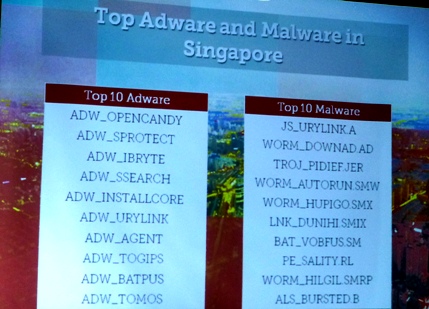
Siah highlighted that common malware like WORM_DOWNAD.AD, codenamed 'Conficker', are still making it to the top 10 in Singapore, implying that Singapore users are not updating their systems regularly, or using an operating system that is no longer supported by Microsoft, such as Windows XP. 

A vulnerability termed CVE-2012-0158 is a favourite means of attack, followed by CVE-2010-0188. The first was discovered in 2012, and the second in 2010, Siah added, showing that victims have not patched their systems against them since 2012 and 2010 respectively. 

Microsoft Office accounts for 53% of targeted attacks, and another 46% are through Adobe Reader. "We live so much with documents today. If there is an attachment I might just click on it, it could present itself as a legitimate document that talks about my work, or a report about the industry that I'm very interested in," noted Siah. 

While lax user practices help the online cybercriminal community, and well-known malware like Zeus is offered free to the community, it may seem like updating systems regularly will be enough protection; but Siah said such updates depend on bugs to be publicly announced by others, after which 'signatures' can be created to detect them. This leaves a window of opportunity in between the announcement of the bug and the availability of the patch for cybercriminals to target users. 

In addition, known vulnerabilities are just the tip of the iceberg. Existing bugs like Shellshock were only announced after decades, while malware can mutate to the point where they are essentially signatureless. "Traditional cybersecurity defences cannot detect such signatureless threats," Siah warned. "Exploiting a vulnerability will be as easy as creating an app."

It is a global problem, even if targeted attacks used to be associated only with countries like US or Russia, Siah further said. Trend Micro is aware of gangs in Brazil and China, and while the cybercriminals may base their operations in one country, they could be connected by the Internet to anywhere else in the world. 

Siah shared that Trend Micro sensors have found that attacks in APAC range across Taiwan, Japan, Indonesia, mainland China, Malaysia, the Philippines and Bangladesh, with Singapore being a relatively minor target. "If a US company has a Taiwan subsidiary, the attackers could go to the subsidiary and once they have gained control of the Taiwan servers they could then jump internally from country to country till they reach the main HQ," Siah pointed out. 

Users should expect that at least one of their accounts, whether on web services or online portals, will be compromised. The prevalence of social media usage in APAC – with about 970 million active social media users – will make users in the region viable targets. Given the predicted increase of attacks next year, cybercriminals will have more opportunities to steal user credentials. As a result, Trend Micro advises users to be more diligent when it comes to password use and online security.

Click here for the full report.

6 June 2014

Checking out Ronaldo? Think twice

According to research from McAfee, part of Intel Security, cybercriminals are most likely to use popular Portuguese footballer Cristiano Ronaldo's name to lure visitors to web pages designed to infect them with malware. The McAfee “Red Card Club” showcases the top eleven Brazil-bound players whose web pages are considered to be risky for fans to search for online. Following Ronaldo are Argentina’s Lionel Messi, Spain’s Iker Cassillas, Brazil’s Neymar and Algeria’s Karim Ziani.
Source: McAfee
Cybercriminals are likely to leverage consumer interest in the world’s most popular sport to lure victims to websites rigged with malware, malicious code capable of infecting a user’s machine and stealing passwords and personal information. McAfee researchers have used McAfee SiteAdvisor site ratings to determine which sites are risky to search when coupled with footballer names, and have calculated an overall risk percentage for each.
According to the research, fans run the greatest risk when visiting sites offering screensaver downloads and videos showcasing the extraordinary skills of the players. Searching for the latest Cristiano Ronaldo content yields more than a 3.7% chance of landing on a website that has tested positive for online threats, such as spyware, adware, spam, phishing, viruses and other malware.  
Players make the McAfee “Red Card Club” by scoring among the top eleven positions in terms of greatest probability by percentage of web page risk.

“Red Card Club” Rank
Player
Country
Risk %
1
Cristiano Ronaldo
Portugal
3.76%
2
Lionel Messi
Argentina
3.72%
3
Iker Casillas
Spain
3.34%
4
Neymar
Brazil
3.14%
5
Karim Ziani
Algeria
3.00%
6
Karim Benzema
France
2.97%
7
Paulinho
Brazil
2.81%
8
Edinson Cavani
Uruguay
2.67%
9
Fernando Torres
Spain
2.65%
10
Eden Hazard
Belgium
2.50%
11
Gerard Piqué
Spain
2.45%

“We want to caution consumers through the McAfee “Red Card Club” to not to let their guard down as they join in all the excitement surrounding the World Cup online. Be especially wary of videos promising to show your idol’s skills as you might get more than you bargain for,” said David Freer, Vice President, Consumer – APAC at McAfee. "Cybercriminals will definitely try to capitalise on ‘World Cup fever’, so it’s wise not to be complacent by downloading content that might put you at risk.”
Tips to Stay Protected
To avoid the summertime blues of becoming infected during the Brazil games and beyond, McAfee suggests:

Beware of content that prompts you to download anything before providing you the content. Opt to watch streaming videos or download content from official websites of content providers.
  • “Free downloads” are the highest virus-prone search term. Anyone searching for videos or files to download should be careful to not unleash malware on their computer.
  • Established news sites may not entice you with exclusives for one solid reason: there usually aren’t any. Stick to official news sites that you trust for breaking news. However, trusted sites can also fall prey to hackers. Make sure to use a safe search tool that will notify you of risky sites or links before you visit them. A complimentary version of McAfee's SiteAdvisor software can be downloaded at www.siteadvisor.com.
  • Don’t download videos from suspect sites. The useful news can typically be found on official video sites, and don’t require users to download anything. If a website offers an exclusive video for you to download, don’t.
  • Don’t 'log in' or provide other information: If you receive a message, text or email or visit a third-party website that asks for your information—credit card, email, home address, Facebook login, or other information—for access to an exclusive story, don’t give it out. Such requests are a common tactic for phishing that could lead to identity theft.
  • If you do decide to search for information on a major event or celebrity in the news, make sure your entire household’s devices have protection, such as McAfee LiveSafe which protects all devices including PCs, Macs, tablets and smartphone and it also includes malware detection software; and McAfee Mobile Security to protect your smartphone or tablet from all types of malware.
  • Always use password protection on your phone and other mobile devices. If your phone is lost or stolen, anyone who picks up the device could publish your information online.