Showing posts with label 2 in 1. Show all posts

9 March 2016

Dell launches new laptops, monitor

· Dell Singapore has introduced new laptops and a monitor for the consumer market.

· XPS 12 features the world’s first 4K Ultra HD display in a 2-in-1 laptop

· Inspiron 11 3000 series is an affordable, ultraportable laptop with three colour options
 · Dell 28 Ultra HD 4K Monitor is the company’s first 4K consumer monitor 

· Dell ProSupport service improves customer experience through simplified, hassle-free support*

Source: Dell. The new Inspiron 11 3000 series laptops.

Dell Singapore has added to the XPS and Inspiron series with the XPS 12 2-in-1 and Inspiron 11 3000 series respectively. Taking home entertainment experience to the next level with over 8 million pixels of sharp Ultra HD clarity on an expansive 28” screen, Dell has also introduced the Dell 28 Ultra HD 4K Monitor.

“Consumers are becoming more varied in their usage preferences. Size, power, style and price are all concerns no matter if you’re a student, working professional or anywhere in between. The expansion of our Inspiron and XPS brand is a reflection of our commitment to meet a diverse array of computing needs with devices that are easy to use and offers exceptional value,” said Rakesh Mandal, Director and GM, Client Solutions, Dell South Asia and Korea.

Source: Dell. The XPS 12 2 in 1.
Transitioning from laptop to tablet via a magnetic connection

The XPS 12 2-in-1 is designed to switch between laptop and tablet with a magnetic connection that enables one-handed transition. It is the only 2-in-1 device with a 4K Ultra HD display option, with 6 million more pixels than a Full HD display. The 2-in-1 comes with a choice of XPS 12 Premier Keyboard or XPS 12 Slim Keyboard with magnetic folio covers designed specifically for the XPS 12. The keyboard options feature backlit keyboards and precision touchpads. The folios magnetically connect to the XPS 12, provide a stand for the tablet with variable angle positions and include a holder for the optional Dell Active Pen. 

Visually arresting, affordable and ultraportable 

The Dell Inspiron 11 3000 is built for the long haul, and comes with the latest Intel processors as well as HD resolution (1,366 x 768). Sporting long-lasting battery life of 10 hours and Dell Backup and Recovery software, the laptop ensures that files remain safe. The laptop comes in three colours: Bali Blue, Tango Red and Alpine White.

Source: Dell. The Dell 28 Ultra HD 4K monitor.
Source: Dell. The Dell 28 Ultra HD
4K monitor.
Dell’s first consumer Ultra HD 4K monitor

The Dell 28 Ultra HD 4K Monitor (S2817Q) combines Ultra HD 4K clarity with dual 9W integrated speakers and a 2 ms panel response time. The Picture-in-Picture (PIP) and Picture-by-Picture (PBP) features also allow users to view content from two different sources simultaneously on one large monitor screen.

Proactive services and support

Dell ProSupport is dedicated to providing maximum support with minimal customer effort. ProSupport combines 24x7 access to expert technicians, onsite service after remote diagnosis* and support for both hardware and software issues**. Customers are provided a one-year Dell ProSupport warranty as standard with their new consumer systems but can also choose to extend their ProSupport warranty with additional one-year or two-year options.

Interested?

All products are now available in Singapore and on Dell.com.sg

· The XPS 12 starts at S$2,099.
· The Dell Inspiron 11 3000 Series (3162) starts at S$369.
· The Dell 28 Monitor (S2817Q) is priced at S$749.

Orders can also be made via Dell’s toll-free number at 1800 394 7486. 

The products will also be available at the IT Show 2016, taking place on 10 to 13 March 2016 at Suntec Singapore.

*Onsite Service after Remote Diagnosis is a determination by online/phone by a technician of the cause of the issue; it may involve customer access to inside of system and multiple or extended sessions. If the issue is covered by the Limited Hardware Warranty and not resolved remotely, the technician and/or part will be dispatched, usually in one or two business days following completion of Remote Diagnosis. Onsite Service is provided by Dell Marketing. Availability varies. Other conditions apply. For complete details about Onsite Service, see dell.com/servicecontracts. Onsite service is not available on Chromebook or Venue tablets, except on the Venue 11 Pro.

**Dell ProSupport includes Dell Comprehensive Software Support for select OEM end-user applications, operating systems, hypervisors and firmware on Supported Products (the “Covered Software Products”) over the telephone, or by transmission of software and other information through electronic means, or by shipping software and/or other information to the customer. Covered Software Products include preinstalled end-user client applications such as Norton AntiVirus software, Microsoft Office software suite, Intuit QuickBooks accounting software, Adobe Photoshop software and Adobe Acrobat software. http://i.dell.com/sites/doccontent/shared-content/services/en/Documents/ProSupport-Comprehensive-Software-Support-List-Enterprise-and-End-User.pdf

17 December 2015

HP announces Elite x2 2 in 1

Source: HP Inc.
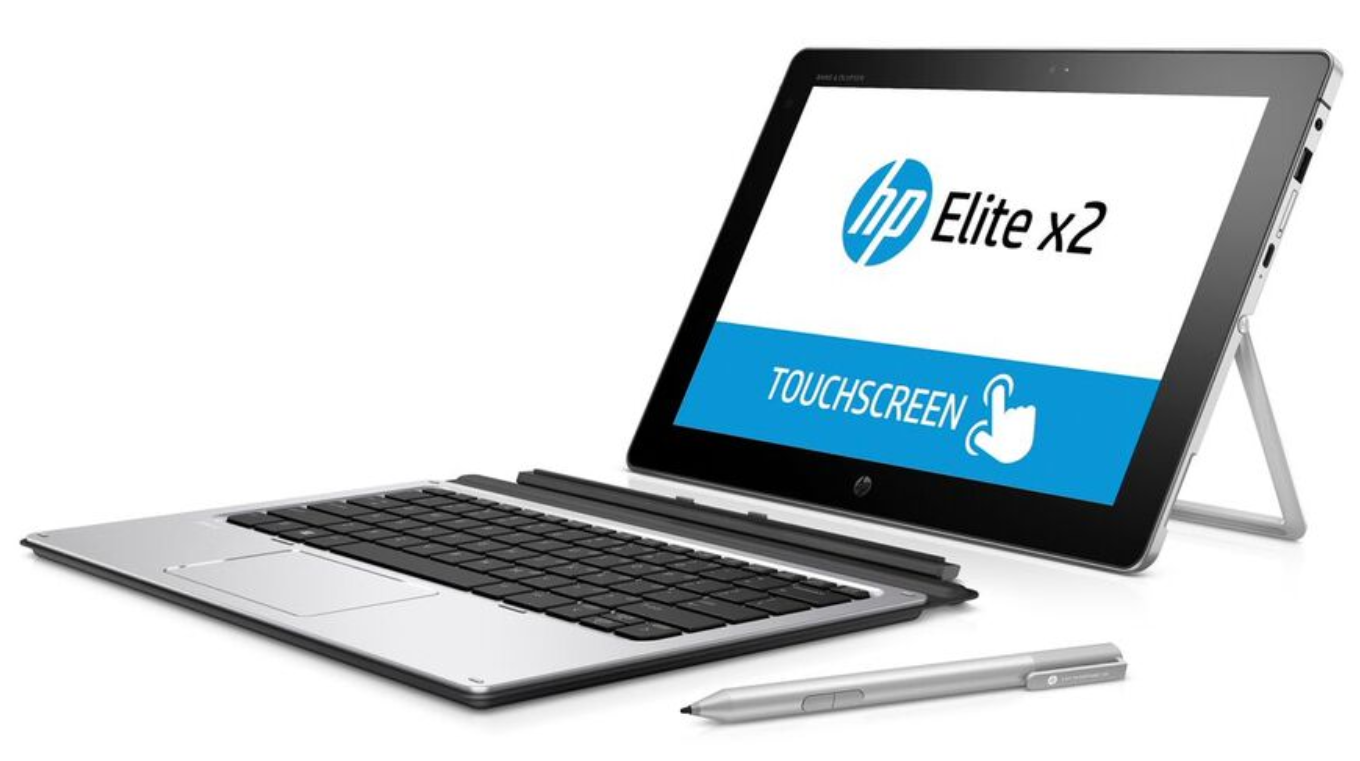
HP today announced the HP Elite x2 – a 2-in-1 tablet that offers the productivity of a full notebook with the convenience of a tablet. The new device blurs the lines between phablets and laptops with an optional LTE modem.

“We designed the HP Elite x2 to be thin, light and powerful in a way that captures the simplicity and elegance users will love while also delivering the durability, serviceability, security and manageability IT departments need to enable true mobile productivity,” said Serena Yong, Managing Director, HP Singapore.

Targeted at the mobile professional, the Elite x2 is crafted from milled CNC aluminum with a focus on aesthetics. At 8.1 mm thin1, the tablet weighs under 840g2 and has a built-in kickstand with 150 degrees of adjustability, allowing a user to set the device upright for viewing and keyboard typing or laying it back for on-screen typing. The device’s 12" diagonal anti-glare HD display has a 3:2 aspect ratio and automatically adjusts to different lighting conditions.

Performance is paramount for mobile professionals, and the Elite x2 caters to the requirements with a long battery life3, Windows 10 and a 6th generation Intel Core M vPro processor. The processors are optimised for high performance with power efficiency4 and solid state disk (SSD) technology, enabling a fanless, virtually silent computing experience with no moving parts. Premium audio tuned by Bang & Olufsen and HP noise reduction software ensure conference call attendees can hear and be heard.

As with the rest of HP’s Elite lineup, the Elite x2 is designed to pass MIL-STD testing5. The device also features added durability with a Corning Gorilla Glass 4 screen and two grades of aluminum alloy to ensure the right balance between strength and weight. The device also incorporates an optional, built-in 4G LTE modem offering the convenience of connectivity virtually anywhere without the need for tethering6. The Qualcomm Snapdragon X5 LTE modem supports all major 3G/4G networks.

To enable flexible content creation on the go, the Elite x2 includes the HP Active Pen with App Launch as a standard feature. Based on WACOM technology, the pen has integrated pressure sensors to help control the width of lines when writing or drawing onscreen. The pen also includes App Launch, a programmable Bluetooth application launch button to quickly launch OneNote or any other pre-specified Windows application.

The Elite x2 provides a choice of two optional, enterprise-class, full-sized, backlit keyboards for easy content creation7. Both keyboards are leveraged from the HP EliteBook Folio 1020 and layered in a stiff aluminum base to create torsional rigidity and stability that rivals a traditional laptop form factor. The HP Advanced Keyboard features an NFC sensor in the touchpad and a built-in smart card reader for security. If the HP Advanced Keyboard is disconnected, the Elite x2 will automatically log off the domain to keep information secure8. The HP Travel Keyboard offers users a thinner keyboard solution, adding 395g in weight while delivering a full 1.5mm keyboard travel and a clickpad.

The Elite x2 is designed with the ports commercial users need by including both Thunderbolt 3 and USB-A ports. The Elite x2 includes three optional wired and wireless docking solutions. The Thunderbolt 3 port on the Elite x2 easily docks to the HP Elite USB-C Docking Station for dual 2K displays or the HP Elite Thunderbolt 65W Dock for dual 4K displays. The Elite X2 can also dock to the HP Advanced Wireless Docking Station through WiGig technology, which enables fast wireless connectivity to the network, displays and devices9. A power pass-through feature in the USB-C port on the device allows users to stay charged for a full work day, while also recharging their accessories.

The Elite x2 is the first tablet designed with the unique combination of BIOS-level security with integrated HP Sure Start, manageability featuring HP Touchpoint Manager10 and an optional Intel Core M vPro processor11. The Elite x2 comes with a host of built-in (not bolted on) security capabilities, including HP Sure Start with Dynamic Protection, HP Client Security, TPM, and an optional fingerprint reader or smart card reader. With the optional Intel Core M vPro processor, IT can power on and remotely manage the Elite x2 over both wired and wireless networks12.

Interested?

The HP Elite x2 1012 is expected to start shipping in Singapore in early January at a starting price of S$1,39913. To make it easy to integrate the Elite x2 into an existing infrastructure, HP offers a range of services and 24x7 support across 180 countries and 230,000 channel partners, including the ability to buy the device from a global SKU. Large customers get the convenience of ordering off one single global SKU code instead of worrying about managing country specific SKUs and part numbers. In addition, hardware and service components are orderable in every country worldwide. 

1 Tablet only without keyboard. 
2 Weight will vary by configuration. 
3 Windows 10 MM14 battery life will vary depending on various factors including product model, configuration, loaded applications, features, use, wireless functionality, and power management settings. The maximum capacity of the battery will naturally decrease with time and usage. See www.bapco.com for additional details. 
4 Multicore is designed to improve performance of certain software products. Not all customers or software applications will necessarily benefit from use of this technology. Performance and clock frequency will vary depending on application workload and your hardware and software configurations. Intel’s numbering is not a measurement of higher performance. 
5 MIL STD 810G testing is pending and is not intended to demonstrate fitness for US Department of Defense contract requirements or for military use. MIL STD and HP Total Test Process test results are not a guarantee of future performance under these test conditions. Damage under these test conditions or any accidental damage requires an optional HP Accidental Damage Protection Care Pack. 
6 WWAN module is optional, must be configured at the factory and requires separately purchased service contract. Check with service provider for coverage and availability in your area. Connection speeds will vary due to location, environment, network conditions, and other factors. 4G LTE not available on all products, in all regions.
7 Optional features sold separately or as add on features. 

8 Depending on domain policy setup 
9 The WiGig-compatible notebook or tablet must be positioned within 1.2 m and without obstruction in the line of sight of the wireless dock. HP Advanced Wireless Docking is compatible with the HP Elite x2 1012 G1 with an optional installed Intel Tri Band Wireless AC with WiGig Combo card available at the time of purchase. 
10 HP Touchpoint Manager requires purchase of a subscription and supports Android, iOS and Windows 7 or higher operating systems and PCs, notebooks, tablets and smartphones from various manufacturers. Not available in all countries see www.hp.com/touchpoint for availability information. 
11 Serviceable by HP Support, HP Certified Technicians, HP Authorized Service Providers or participants in the HP Self-Maintainer Program. See hp.com/partners/SMprogram for more details. 12 Some vPro functionality, such as Intel Active management technology and Intel Virtualization technology, requires additional 3rd party software in order to run. Microsoft Windows required. 
13 Estimated street prices. Actual prices may vary.

27 November 2015

Microsoft launches new Surface Pro model in Singapore


Microsoft has announced the retail availability of Surface Pro 4 in Singapore. Surface Pro 4 is the thinnest, lightest Surface Pro, yet powerful  enough to run full Microsoft Office and brings Windows 10 features to life - including Windows Hello, Surface Pen and Microsoft Edge.

“Surface Pro 4 brings together the performance of a laptop and the full power of Windows 10 with the portability of tablet,” said Arthur Huang, Director, Consumer Channels Group, Microsoft Singapore. “Surface has transformed the category by focusing on productivity, creating a highly versatile device that people love to use.”

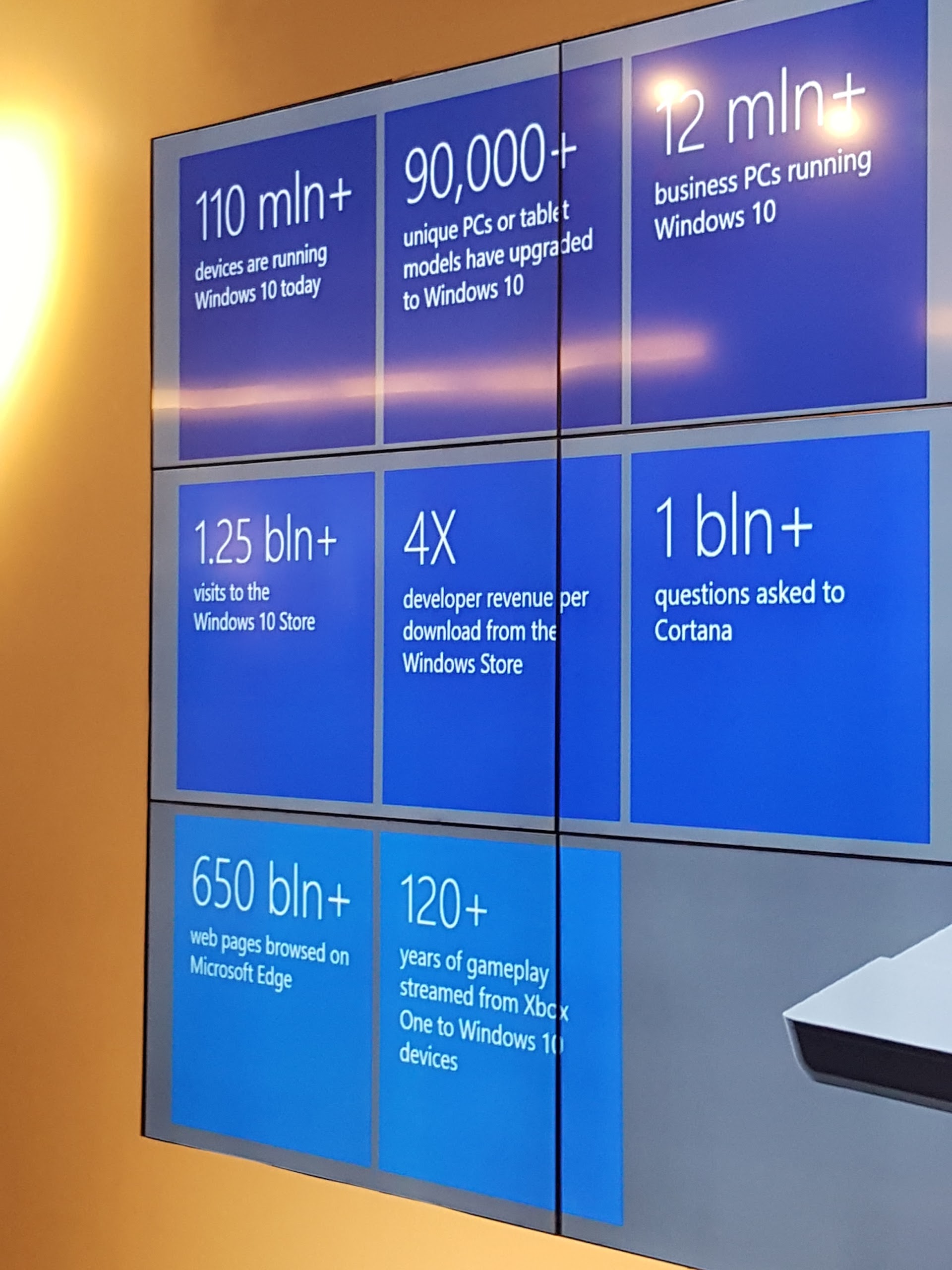
Huang showed some numbers related to Windows 10. 

At just 8.4 mm thick, Surface Pro 4 features Windows 10 Pro, a 12.3" PixelSense Display and 6th Generation Intel Core m, Core i5, and Core i7 processors. Surface Pro 4 is not only 30% more powerful than Surface Pro 3 but also quieter, runs cooler and also longer, with up to nine hours of battery life*.

“The 6th Generation Intel Core processor family sets a new standard of computing with enhanced performance, graphics, and battery life, making possible the remarkable performance and power-efficiency you see in ultrathin devices like Surface Pro 4,” said George Chacko, Director, Pricing & Product Marketing Group, Intel Asia Pacific & Japan.

“Together with Microsoft, Intel is constantly pushing the limits of personal computing with state-of-the-art experiences, and we’re very excited to bring these innovations to market with Surface Pro 4.”

A recent survey** conducted by Microsoft with 1,200 Asian consumers under the age of 25 years of age found that 42% of respondents wished to get a new 2-in-1, tablet or laptop device this festive season. Fifteen percent of respondents already have a 2 in 1, Huang shared, while 59% want a touch surface on all their devices. Additionally, 43% want a digital assistant, while 41% want a digital pen.

"Millennials hate passwords," said Huang. "51% thought 'too many passwords' is an issue in their everyday digital lives. Seventy percent would be willijng to pay to overcome security and privacy challenges, and 52% identified privacy and security as their top concerns with digital lifestyles."

Surface Pro 4 is perfect for people who place a premium on portability, yet require significant productivity and performance – mobile professionals or people in business environments who need high levels of corporate access, data security and central manageability.

New Surface accessories, such as the new and improved Surface Pro 4 Type Cover***, take Surface Pro 4 from tablet to laptop in an instant. The Type Cover features a redesigned mechanical keyboard with optimal key spacing for fast and fluid typing. The redesigned Surface Pen packs 1,024 levels of pressure sensitivity, letting you write, draw and mark documents with precision 'ink'  on one end. A new feature is an 'eraser' on the other end.

The Surface Pro 4 features as musical support.
The Surface Pro 4 as an artist's tool. 
The Surface Pro 4 renders 4K video with ease.

With Surface Pro 4, Microsoft’s commitment to business continues with the largest set of early adopters of a Surface device in business ever. Already, customers from a variety of industries including mobile field sales, professional services, energy and the public sector have purchased Surface Pro 4 to help streamline operations and help employees maximise productivity.

The Surface Pro 4 is powerful enough to run Autodesk software.

Additionally, Microsoft will double the commercial reseller channels in Asia Pacific to 300 partners by early next year, including 20 commercial resellers in Singapore, so businesses can more quickly and easily incorporate Surface into their environments.

Interested?

The Surface Pro 4 Intel Core m, Core i5, and Core i7****  models are available at microsoftstore.com, more select Singapore retailers - not just Challenger, Courts, and Harvey Norman but also at Newstead, a total of 70 stores, as well as via authorised commercial partners.

Surface Pro 4 starts at an estimated retail price of S$1,399.

Hashtag: #DoGreatThings

*For video playback, testing conducted by Microsoft in September 2015 using s preproduction Intel Core i5, 256GB, 8GB RAM device. Testing consisted of full battery discharge during video playback. All settings were default except Wi-Fi, which was associated with a network and Auto-Brightness, which was disabled. Battery life varies significantly with settings, usage and other factors.

**An online survey was conducted with YouGov with 1,200 youths under the age of 25 in Australia, Malaysia, Singapore, Indonesia, Thailand, the Philippines, Vietnam, Japan, Korea, mainland China, India, Hong Kong and Taiwan. 

***Sold separately.

****The i7 models begin shipping from 10 December 2015.

12 February 2015

HP launches slew of mobile solutions for business productivity

HP has unveiled new commercial mobility solutions that transform the workplace and unlock the power of productivity. Eight new mobile devices plus accessories allow companies to streamline and simplify their business operations.


Anneliese Olson, VP and GM, Personal Computing, HP Asia-Pacific and Japan, spoke about how the launch of new products brought together changing trends in the workforce, workplace and workstyles while transforming workflow.

The company has created a complete mobility solution for businesses including those with specific needs in various vertical industries, including education, field service, healthcare, public safety and retail. HP also announced HP Touchpoint Manager, a cloud-based solution that works across PCs, mobile devices and major operating systems, including Apple iOS, Google Android, and Microsoft Windows. 

“Mobile devices are changing how we live and work, and they pose significant challenges to IT departments who have to support their now mobile workforces while keeping corporate data managed and secure,” said Serena Yong, GM, Printing and Personal Systems, HP Singapore and Malaysia. 

“HP is the world’s largest commercial computing provider to the world’s largest companies. No other company is better suited to address commercial mobility than HP. Our devices feature built-in security, manageability, and durability packaged in innovative, stylish designs that end users crave.”

According to HP, the current approach to business mobility is to retrofit consumer devices and tweak them to make them enterprise-ready on a on-off basis, or drive customer lock-in to a single platform or device. HP is taking a modular approach featuring secure devices that are designed from the ground up for business use.

HP is also supporting both Android and Windows, giving business customers a choice of application ecosystems and user experiences. Tablets, 2-in-1 devices, and notebooks running Windows along with tablets built on Android all feature built-in security such as remote wipes and can be tailored to meet specific use-case requirements with a focus on embracing business mobility. These new devices include:

HP Pro Slate 8 and HP Pro Slate 12
These are commercial-grade high-definition1 (HD) Android tablets. Available in 8" or 12" diagonal displays respectively, the tablets are powered by a Quad-Core Qualcomm Snapdragon 800 series processor2, and support a 4:3 aspect ratio for viewing business documents and accessing business applications. The lightweight tablets are under 8mm thin and offer business-day battery life3 with enterprise-grade security and manageability. Both devices feature a wide range of accessories enabled by HP’s Zero Force connector.

HP Pro Slate 8 is one of the first tablets to market using Corning Gorilla Glass 4, Corning’s toughest cover glass to date. The HP Duet Pen, the first to use Qualcomm Snapdragon digital pen technology4 on both a tablet and regular paper, is included with the HP Pro Slate 8 and HP Pro Slate 12. The pen is part of the HP Blended Reality Ecosystem, helping employees be more productive and create easily shareable content by writing and digitising input from the device’s screen or via a regular sheet of paper using the HP Paper Folio5. Users can write on paper with the Duet Pen and see the writing appear on the tablet.

HP Elite x2 1011 G1
The HP Elite x2 1011 G1 is a lightweight, 11.6" diagonal 2-in-1 Windows device running Windows 8 Pro, transforming from a tablet to a laptop with Ultrabook configurations available6. Tested to military specs for durability7, the Elite x2 adapts to personal work preferences with optional accessories8 that include an industry-first WiGig enterprise wireless dockbased on a joint collaboration with Intel, along with a cover, a lightweight travel keyboard and an optional Wacom pen10.

HP Pro Tablet 10 EE, HP Pro Slate 10 EE 
The Intel Atom-based HP Pro Tablet 10 EE running Windows and the HP Pro Slate 10 EE Android tablet are built for the mobile workforce in the education, healthcare, manufacturing, and retail verticals. Both feature a durable design that passes IP-5211 testing for dust, moisture, and drop testing12, an on-board garage for the optional stylus, plus a hard-wired keyboard base option13.

HP Pro Tablet 408 G1
This affordable, 9 mm thin, 8" diagonal Intel Atom-based business tablet provides a full Windows 8 Pro experience and a family of mobile accessories14 to help keep users productive when away from their PC. Business-class features include micro-HDMI, up to 64 GB of storage15 and an 8 MP rear camera with flash.

HP ElitePad 1000 G2 Healthcare Tablet
This tablet has been designed to improve caregiver productivity and enhance patient interaction. The durable and lightweight solution has an antimicrobial16 treatment to protect the product, can be cleaned easily, and meets IP 5417 specifications. Deployable in any clinical environment, the tablet helps reduce the risk of medical errors by using a 2D barcode reader to validate personnel, patients, and catalogue and administrate medication.

HP ElitePad 1000 G2 Rugged Tablet
This version of the ElitePad 1000 G2 can be used by mobile workers in manufacturing or in-field environments. IP 6518 rated for water and dust and MIL-STD 81019 testing, the tablet boasts up to 20 hours of battery life20 and a 2D barcode reader.

HP Retail Case for ElitePad 
The all-new HP Retail Case for ElitePad offers retailers a versatile mobile and fixed point of sale (POS) solution for their employees, with two built-in cradle areas for mounting payment devices and the ability to dock to existing POS solutions. The new solution features hand and shoulder straps, giving retail store operators an easier and more comfortable way to access inventory and product availability, as well as improving the checkout experience. The HP Retail Case for ElitePad also allows retailers to physically attach a mobile payment device (PED or PIN entry device) of choice to the case from vendors like Ingenico, Verifone, AnywhereCommerce, and PayPal and accept a range of payments such as EMV, NFC, MSR, and most digital wallets. 

HP EliteBook Folio 1020 family 
The industry’s thinnest and lightest business-class notebooks, the family consists of the HP EliteBook 1020 and the HP EliteBook 1020 Special Edition (SE), both at 15.7 mm thick. HP’s exclusive blend of magnesium-lithium alloy and reusable carbon fibre gives the notebooks a weight of 1 kg21. Read more about this family in our accompanying blog post here.

New HP commercial devices now come with HP Touchpoint Manager22 and provide the option to access the iPass global Wi-Fi network23. Customers who purchase new HP devices with the iPass option will be able to register and automatically get access to millions of hotspots on the iPass global Wi-Fi network24 for one year at no additional cost. 

Pricing and availability25 
  HP Pro Slate 8 will be available in Singapore from end of March with a starting price of S$699. 
 HP Pro Slate 12 will be available in Singapore from end of March with a starting price of S$849. 
 HP Elite x2 1011 G1 will be available in Singapore from end of February with a starting price of S$1,299. 
 HP Pro Tablet 408 G1 will be available in Singapore from end of February with a starting price of S$699. 
 HP Pro Slate 10 EE will be available in Singapore from end of February with a starting price of S$399. 
 HP Pro Tablet 10 EE is available now with a starting price of S$459. 
 HP ElitePad 1000 G2 Healthcare Tablet will be available in Singapore from March. Pricing will be set closer to availability. 
 HP ElitePad 1000 G2 Rugged Tablet will be available in Singapore from May. Pricing will be set closer to availability. 
 The availability and pricing for the HP Retail Case for ElitePad will be announced at a later date. 
 The HP EliteBook Folio 1020 Standard Edition will be available in Singapore from March with a starting price of S$2,399, and the HP EliteBook Folio 1020 Special Edition, in May. Pricing for the Special Edition will be set closer to availability. 

1 High-definition content is required for high-definition images.
2 Multi-Core is designed to improve performance of certain software products. Not all customers or software applications will necessarily benefit from use of this technology. 64-bit computing system required. Performance will vary depending on your hardware and software configurations. Qualcomm’s numbering is not a measurement of clock speed. 
3 Tested by HP using continuous HD video playback, 720p (1280x720) resolution, 150 nits brightness, system audio level at 50%, player audio level at 100%, played from local storage, headphone attached, wireless off, auto dimming off. Actual battery life will vary depending on configuration and maximum capacity will naturally decrease with time and usage. 
4 The HP Duet Pen is enabled by Qualcomm Snapdragon digital pen technology by Qualcomm Technologies. 
5 The HP Paper Folio (the notepad which fits into the tablet case) is sold separately. 
6 Not all models qualify as an Ultrabook. 
7 MIL STD 810G testing is not intended to demonstrate fitness for US Department of Defense contract requirements or for military use. Test results are not a guarantee of future performance under these test conditions. 
8 Sold separately or as an optional feature. 
9 The WiGig-compatible notebook or tablet must be positioned within 1.2 m and without obstruction in the line of sight of the wireless dock. HP Advanced Wireless Docking is compatible with the HP Elite x2 1011 G1 with an optional installed Intel Tri Band Wireless AC with WiGig Combo card. 
10 The HP Elite x2 1011 Wacom Pen is available as a configurable option available on models ordered with a digitiser screen. Models without a built-in digitiser are incompatible with the HP Elite x2 1011 Wacom Pen. 
11 IP-52 is not covered under HP limited warranty. 
12 IP-52 and HP Total Test Process test results are not a guarantee of future performance under these test conditions. 
13 Sold separately or as an optional feature. 
14 Sold separately or as an optional feature. 
15 For storage drive, GB = 1 billion bytes. Optional Micro-Secure Digital eXtended Capacity (SDXC) card sold separately. For solid state drives (SSD), 1 GB = 1 billion bytes. Actual formatted capacity will be less than this number. Up to 6 GB of system disk is reserved for Windows system recovery and EFI system partition. 
16 IP 54 testing is completed. The solution is planned to be covered under HP limited warranty for IP 54 dust and water ingress. Quick release pins, camera lens, flash cover, bar code reader cover, screws, screen, and HP logo are not treated with an antimicrobial. 
17 The solution is covered under HP limited warranty for IP 54 dust and water ingress. 
18 The solution is covered under HP limited warranty for IP 65 dust and water ingress. 
19 MIL STD testing is pending and is not intended to demonstrate fitness for US Department of Defense contract requirements or for military use. Test results are not a guarantee of future performance under these test conditions. 
20 Testing conducted by HP consisting of full battery discharge while running a series of productivity scripts against the following applications (which may or may not be included with your particular product): Adobe Acrobat Reader 7.0, Adobe Illustrator CS2, Adobe Photoshop CS2, Apple Quicktime 7.1, Intervideo WinDVD 8, Macromedia Flash 8, Microsoft Office 2003 Pro, Microsoft Project 2003, and Winzip 10.0. Prior to testing, the system was fully charged, display brightness was set at 60 nits, wireless was turned off, and auto dim, suspend, hibernate, and all other programs, utilities, and services not essential to running the computer system or battery life test were disabled. Battery life will vary depending on the product model, configuration, loaded applications, features, use, wireless functionality, and power management settings. The maximum capacity of the battery will naturally decrease with time and usage. 
21 Final weight of the 1020 is 1.2 kg, that for the 1020 SE is pending. 
22 HP Touchpoint Manager supports Android, iOS, and Windows operating systems, and PCs, notebooks, tablets, and smartphones from various manufacturers. Not available in all countries. See www.hp.com/touchpoint for availability information. HP Touchpoint Manager requires purchase of a subscription. 
23 HP commercial and consumer Notebook and Tablet PCs with OS of Windows 8.1, Android 4.2.2 and above. Devices with Windows 7 and Chrome OS may be added in subsequent months. Devices with FreeDos and Ubuntu OS are not included. For more information, visit www.hp.com/go/stayconnected. 
24 Connectivity not available everywhere. The offer excludes premium iPass inflight access on planes. Subscription renewal and purchase of the iPass service required after the one year trial period. To view a hotspot location map and to learn more about the service visit www.ipass.com/hpoffer. 
25 Estimated street prices. Actual prices may vary. 

24 September 2014

HP 2 in 1, printer ideal for home offices

HP today announced a PC and a printer targeted at home offices. 

Designed to be fashionable and functional, the HP Pavilion x2 will be available in Singapore from October for a starting price of S$499**. The Pavilion x2 can be used as a 10" diagonal Windows tablet and shifts into a full-featured laptop with a detachable dual-purpose magnetic keyboard/cover that both protects the screen and serves as a multi-position stand.

The 2-in-1 PC is powered by an Intel Atom processor, and features front-firing speakers with DTS sound and a battery that lasts up to 11.45 hours*. It currently comes with the Tiffany blue keyboard/cover, with Moonstone gray and Lavender purple keyboard/covers to be available by end-year.


Source: HP. The HP Pavilion x2.
HP also announced a new HP ENVY printer that supports the latest mobile printing solutions, providing an easy way to print directly from smartphones and tablets***. The new printer can be set up quickly and easily with a smartphone or tablet. 

The HP ENVY 7640 e-All-in-One printer comes with NFC touch-to-print capability, a 25-page automatic document feeder, automatic two-sided printing and a fax function. The HP ENVY 7640 e-All-in-One has a larger 8.9cm colour touch-screen panel and an automatic photo tray that supports 4R (10 x 15cm) and 5R (13 x 18cm) printed photograph formats. The printer will be available in November starting from S$299**. 


Source: HP.
The HP ENVY 7640 e-All-in-One printer.
The new HP ENVY 7640 supports WiFi Direct, a feature that allows users to maintain a simultaneous connection with both the printer and the Internet. Ink cartridges cost S$19 for black ink and S$24 each for coloured inks. 

Sang Hoon Park, Printing Category Director, Printing & Personal Systems Group, Singapore, noted that inkjets and colour lasers serve different markets today. "Inkjets have better quality with the right media. If you don't print a lot, inkjets are best. Colour lasers are more for the commercial and enterprise market. A lot of LaserJets are bought for their high duty cycles," he said. While the new printers will support a recommended 300 pages per month, HP's lasers can print 5,000 to 6,000 pages a month.

*Battery life will vary depending on numerous factors including product model, configuration, loaded applications, features, use, wireless functionality and power management settings. The maximum capacity of the battery will naturally decrease with time and usage. Additional details are available at www.bapco.com. 
**Estimated street prices. Actual prices may vary.
***Local printing requires mobile device and printer to be on the same network or have a direct wireless connection to printer. Wireless performance is dependent upon physical environment and distance from access point. Wireless operations are compatible with 2.4 GHz operations only. Remote printing requires an internet connection to an HP web-connected printer. App or software and HP ePrint account registration may also be required. Wireless broadband use requires separately purchased service contract for mobile devices. Check with service provider for coverage and availability in your area. See www.hp.com/go/mobileprinting for more details.

10 September 2014

Acer introduces three 2 in 1 notebooks

Acer has expanded its 2-in-1 notebook line with the new 11.6" Aspire Switch 11 series and a new Switch 10 that boasts a 1080p Full HD 10.1" display. The Aspire Switch 2-in-1 lines combine a Microsoft Windows-based notebook and tablet in one flexible device.

Source: Acer. The Aspire Switch 10.
Thin, lightweight and durable, the Aspire Switch series was made for work and on the road. Four modes are enabled for touch, typing, viewing, and sharing. The magnetic detachable Acer Snap Hinge has two hooks to firmly connect the tablet to the keyboard and a two-way connector that holds the tablet for two-sided viewing. This design enables easy transitioning between modes, latch-free keyboard docking and additional storage capability.


Source: Acer. The Aspire Switch 11.
"Our new models sporting larger 11.6" screens with durable Corning Gorilla Glass 3, an anti-fingerprint coating and a responsive Chiclet keyboard should be a hit with both students and professionals alike,” Jerry Kao, GM of Acer Notebook Business Group said.

“2-in-1s offer a great value proposition to consumers who want a laptop and a tablet in one device,” said Navin Shenoy, VP of Intel PC Client Group and GM, Mobile Client Platform Division. “Acer’s new line of 2-in-1s provides more compelling choices that elegantly work, share and play in a variety of modes – all powered by the outstanding performance of Intel processors.”


Two models are available in the Aspire Switch 11 series. Engineered for power users, the Aspire Switch SW5-171 features a Full HD 1080p display and a HD webcam for enjoying images and videoconferences in sharp detail. Up to a fast 4th generation Intel Core i5 processor delivers plenty of power for multitasking and fueling casual games and movies. It’s also outfitted with 4GB memory and up to a 128 GB* SATA hard drive for storing a large archive of data and applications. Connectivity to external storage, peripherals and other digital devices is provided via full-sized USB 3.0 and USB 2.0 ports.

Designed for mainstream users, the Aspire Switch SW5-111 is outfitted with a 1,366 x 768 resolution display. It offers an Intel Atom Z3745 quad-core processor, 2GB memory and up to 64GB* eMMC storage. Two USB 2.0 ports – one full sized and the other micro – provide connectivity to peripherals and digital devices. A 2.0MP front camera with Full HD 1080p audio/video recording enables videoconferences and capturing images on the fly.

Both models include Microsoft Windows 8.1 for full PC productivity, micro HDMI for connecting a full-size display via just one cable and MicroSD for reading a wide variety of SD cards. Wireless connectivity is enabled with Bluetooth 4.0 and 802.11 a/b/g/n.

The Aspire Switch 10 offers a new model, the SW5-012 that features a Full HD 1,920 x 1,200 or a HD 1,280 x 800 10.1" display. One of the thinnest 2-in-1 devices on the market, it measures less than 8.9 mm thin in tablet mode and 20.2 mm with the keyboard dock.


The tablet weighs 0.585 kg while the combined tablet and keyboard is 1.17 kg. It delivers battery life of up to 8 hours** (HD) and 7 hours** (Full HD) for almost a full day of computing. This model provides solid performance offering up to 32/64GB* of storage, 2GB of RAM and an Intel Atom quad-core processor. It offers a 2MP HD webcam with 1,920 x 1,080 resolution and 1080p Full HD audio/video recording. The Switch 10 SW5-012 also comes with Microsoft Windows 8.1 with Bing and Microsoft Office 365 Personal*** at no additional expense, so users can create and edit Microsoft Word, Excel and PowerPoint documents virtually everywhere.

Zero Air Gap technology delivers sharp images, while Acer LumiFlex optimises screen visibility during outdoor activities, even in bright sunlight. IPS technology provides wide viewing angles and accurate colors from edge to edge. The Precision Touchpad supports six touchpad gestures and delivers greater sensitivity and palm rejection by distinguishing between intentional finger gestures vs. accidental contact by the palm of the hand.

Built-in Acer BYOC**** means users can easily access and manage their data anywhere. Acer BYOC Apps offer real time information, data management, and data security across multiple devices for immediate synchronising.

Optional accessories include an Acer Active Pen that provides fast, precise input for those who prefer to handwrite notes, an Acer Snap Case that protects and packs the tablet and keyboard for easy carry, and a micro USB cable that serves as a connection and charging hub.

The Acer Aspire Switch 11 series will be available in October in EMEA with prices starting at €399. The Acer Aspire Switch 10 series will be available in September in EMEA with prices starting at €329. To find out about availability, product specifications and prices in specific markets, please contact your nearest Acer office or retailer via www.acer.com.

*Accessible capacity varies: (MB = 1 million bytes; GB = 1 billion bytes)
**Actual battery life varies depending on product specifications, computer settings and applications or features launched. Maximum capacity for all batteries diminish with time and use.
***Office 365 Personal one-year subscription must be activated required within a limited time. Specifications vary depending on region.
****Acer BYOC is supported on Windows 7 and Windows 8 Desktop, Windows RT, Android 2.3 or later, and iOS 5.1 or later. To set up your personal Acer BYOC service, you'll need at least one PC and one mobile device with the Acer BYOC Apps installed and must designate one PC as your Personal Cloud Storage.

8 September 2014

Acer launches Aspire R 13 and R 14 convertible notebooks

Acer has announced the Aspire R 13 and Aspire R 14 Series, two new convertible notebook lines that can transition between various notebook and tablet style modes of operation. Both notebooks are designed for those who don’t want to give up a traditional notebook design, but want more options and flexibility. 
Source: Acer. The R 13 in one mode.

“Acer’s goal is to deliver an experience consistently beyond everyone’s expectation at all price points,” said Jason Chen, Corporate President and CEO, Acer. “These new Aspire convertibles are the perfect device to sit in the middle of your mobile world - a device that is both portable and capable of efficient productivity.”

Less than 25.4 mm thin and just over 1.5 kg, the Aspire R 13 Series incorporates a 13.3" display and 
Acer’s unique Ezel Aero Hinge that allows the display to rotate into six different positions:

Notebook mode - provides a precise and spacious keyboard for maximum productivity.
Ezel mode - brings the display close for convenient reading and web browsing.
Stand mode - makes it easy to draw a flow chart, take notes, brainstorm with others or edit artwork. The stand is sturdy enough for drawing and other touchscreen interactions.
Pad mode - enables the R 13 to be used as a tablet for web browsing, playing games or watching videos. The screen fits perfectly in the chassis frame, so it’s streamlined and easy to hold.
Tent mode - the ideal position when space is limited, such as an airplane’s seatback tray.
Source: Acer. The Aspire R 13 in anothe rmode.

Display mode - good for viewing photos and video or playing games with others.

All R 13 Series models offer premium touch screen displays with super crisp images and fine detail. Both the touchscreen and outer lid are both encased in a sheet of Corning Gorilla Glass 3 for durability. In addition, anti-fingerprint technology helps eliminate smudges and makes the displays easier to clean, while Corning’s newly developed AR/ETC technology minimises reflections and improves the display’s contrast. A built-in light sensor automatically adjusts the screen’s brightness to enhance the screen image, making it easier to view against the ambient lighting. 

Available in either super high-resolution (WQHD) (2,560 x 1,440) or full high-definition (FHD) (1,920 x 1,080), both display options include Zero Air Gap Technology, which reduces reflections, heightens contrast, creates bright and crisp images and improves readability in sunlight. FHD models also feature IPS technology, which provides wide viewing angles, making them ideal for sharing movies and photos or for work presentations. 

The R 13 Series can also be used with an optional Acer Active Pen for drawing, creating and collaborating. The pen comes with a pressure sensor for professional drawing and a hover sensor for easy access to functions. It also supports palm rejection so users can write on the screen comfortably. 


For maximum performance, models offer Intel Core i5 or i7 processors, up to 1TB Solid State Drives with RAID-0 support and up to 8GB of memory. Leading audio features include Dolby Digital Plus Home Theatre for cinematic surround sound, and Acer Purified Voice, a combination of hardware (dual-array mic) and software (voice recognition and audio processing). It is also Skype certified. To keep the powerful R 13 running cool and quiet, the Aspire R 13 boasts a dual air-intake design for noise-free computing. Models with a FHD display deliver up to eight hours of battery life. 


All models can also be used with the optional Acer Active Pen. The R 14 Series of convertible notebooks features a 360 degree dual-torque hinge that allows it to be used in four usage modes. 

Acer’s new R 14 notebook incorporates a 360 degree dual-torque hinge design that allows effortless transformation into four different modes for productivity and entertainment needs - notebook, pad, display or tent. 

Constructed of strong zinc alloy and soft rubber, the hinge design allows the lid to be laid completely flat, without any gap between the chassis and lid, for easy collaboration and sharing. In tablet mode, the display can be flipped over and lays completely flat against the chassis as well, for a clean, streamlined design. When the notebook is used in display mode, the hinge slightly raises the entire system, preventing the keyboard from touching the table or other surface. For convenience, the images and audio on the R 14 automatically reverse channels when the modes are switched, so the visuals and sound are always aimed the right way.

The R 14 features a 14" HD (1,366 x 768) display with Zero Air Gap technology. As with the R 13, the R 14 supports Acer Touch Tools to help the user capture, collect, write and share screen data effortlessly through touch. 


The Skype Certified models are available with a range of Intel processors, including Pentium, Core i3, i5 or i7, and can be configured with up to 12GB of memory for powerful performance. Some models offer NVidia GeForce 820M graphics to enrich the overall visuals. There are two options for storage, 500GB or 1TB.

To find out about availability, product specifications and prices in specific markets, please contact your nearest Acer office or retailer via www.acer.com.