Showing posts with label iPhone. Show all posts

23 September 2019

LifeProof announces cases for the new iPhones

LifeProof has launched FLiP, the first LifeProof iPhone case with built-in storage.

“We rely on our iPhones to capture our photos and videos, deliver long-lasting battery life and keep us connected around the world,” said LifeProof CEO Jim Parke.

Source: LifeProof.
“Apple’s history of innovation is unparallelled and LifeProof is always ready to accentuate the phone’s clean aesthetic with cases that will keep them running at peak performance.”

Tested to 2 m of drop protection, the single-piece FLiP case has a wallet-inspired panel that holds cards and cash on the back of the case instead of next to the screen. The folio serves as a media-viewing stand and a cutout around the camera eliminates two-handed photo taking. The fabric is water- and stain-resistant and a magnetic bottom keeps the folio secured to the back of the case.

NËXT delivers fresh new colours for iPhone 11, iPhone 11 Pro and iPhone 11 Pro Max. NËXT is drop-proof up to 2 m, dirt-proof and snow-proof.

SLɅM is newly-designed as a one-piece case. SLɅM cases are available in clear, colour or graphic backs and colourful bumpers that offer drop protection up to 2 m.

FRĒ now features its most streamlined body style ever, with a built-in screen protector. Its signature waterproof protection is up to 2 m along with drop-proof, dirt-proof and snow-proof coverage. FRĒ will be available soon for iPhone 11, iPhone 11 Pro and iPhone 11 Pro Max in a variety of colours.

Details:

FLiP cases are available now on lifeproof.asia for the iPhone 11, iPhone 11 Pro and iPhone 11 Pro Max. FLiP, NËXT and SLɅM are also compatible with glass screen protectors on iStudio Retail Stores and istudiosg.com.

Device
Series
Recommended retail price
iPhone 11, 11 Pro and 11 Pro Max

FRĒ
S$136.90
NËXT
S$104.90
SLɅM
S$56.90
FLiP
S$75.90

Hashtag: #lifeproofasia 

11 September 2019

StarHub shares pricing for latest iPhones

Source: Apple. The iPhone 11 Pro and iPhone 11 Pro Max come in midnight green, space grey, silver and gold finishes.
StarHub has been quick off the mark with pricing for the just-announced dual-camera iPhone 11, iPhone 11 Pro and iPhone 11 Pro Max. The iPhone 11 Pro and iPhone 11 Pro Max are a new pro line for iPhone that delivers advanced performance.

The pro line features a new Super Retina XDR display, the brightest display ever in an iPhone, Apple said. The Apple-designed A13 Bionic chip powers performance and battery life that lasts through the day. A new triple-camera system provides a pro-level camera experience with an ultra wide, wide and telephoto camera, delivering better low-light photography and high-quality video.

In Singapore, Apple said the iPhone 11 Pro and iPhone 11 Pro Max will be available in 64 GB, 256 GB and 512 GB models in midnight green, space grey, silver and gold starting at S$1,649 and S$1,799, respectively, from apple.com/sg, in the Apple Store app and Apple Stores. The iPhone 11 Pro and iPhone 11 Pro Max are also available through Apple Authorised Resellers and select carriers (prices may vary). The US announcement noted that preorders begin September 13 and the phones will be in stores beginning September 20.

For StarHub prices will range begin at S$587 for an iPhone 11, S$784 for the iPhone 11 Pro Max and S$814 for the iPhone 11 Pro. Customers will be able to buy the new Apple phones from as low as S$6 per month on instalment, when paired with a StarHub #HelloChange mobile plan. The #HelloChange mobile plans offer customers huge data bundles with free surfing on weekends. Caller ID is free forever - this is not the case with the competition, StarHub notes - and there are no hidden administrative charges.

StarHub will also offer Apple Watch Series 5 with Always-On Retina display, and the new seventh-generation iPad.

Customers will be able to preorder iPhone 11, iPhone 11 Pro and iPhone 11 Pro Max, and buy Apple Watch Series 5 and the new iPad soon, StarHub said. Browse pricing and check preorder and retail availability when the details are available.

29 September 2017

Charge the iPhone and use a 3.5mm jack at the same time

Belkin, the mobile accessories provider, has announced the 3.5 mm Audio + Charge RockStar adapter for the iPhone 8, iPhone 8 Plus, iPhone X, iPhone 7, and iPhone 7 Plus. The 3.5 mm Audio + Charge RockStar allows users to simultaneously charge their iPhone and listen to music using 3.5 mm headphone jack devices.

This adapter plugs into the Lightning connector and supports data synching through the Lightning connector as well as microphone and remote control on the headphone jack.

"We're excited to offer yet another way for iPhone owners to simultaneously charge and listen to audio using the headphones that they know and love," says Marco Peters, VP, product management, Belkin. "We listened to consumers who wanted a reliable way to use their existing headphones, and we took learnings from last year's Lightning Audio + Charge RockStar to deliver what people asked for and more."

The Belkin 3.5 mm Audio + Charge RockStar is compatible with headphones, speakers and other audio devices that connect via a 3.5 mm headphone jack, and is MFi-certified to meet Apple specifications for use with iPhone 8, iPhone 8 Plus, iPhone X, iPhone 7 and iPhone 7 Plus running iOS 9 or later. It also supports remote and mic control functions on MFi-certified 3.5 mm headphones. 

Interested?

The 3.5 mm Audio + Charge RockStar has a manufacturer's suggested retail price (MSRP) of S$59 on Apple.com, at Apple stores worldwide and at Nubox stores.

13 September 2016

Singtel releases iPhone 7 and iPhone 7 Plus price plans

Singtel has released Apple iPhone 7 and iPhone 7 price plans on iphone.singtel.com:


Combo Plan
Combo 1
Combo 2
Combo 3
Combo 4
Combo 6
Combo 12
iPhone 7 32GB
S$698
S$568
S$378
S$188
S$28
S$0
iPhone 7 128GB
S$858
S$718
S$538
S$338
S$188
S$0
iPhone 7 256GB
S$1,008
S$878
S$698
S$498
S$338
S$0
iPhone 7 Plus 32GB
S$878
S$748
S$568
S$368
S$208
S$0
iPhone 7 Plus 128GB
S$1,038
S$898
S$718
S$518
S$368
S$0
iPhone 7 Plus 256GB
S$1,188
S$1,048
S$868
S$678
S$518
S$0


Easy Mobile
S
M
L
XL
iPhone 7 32GB
S$657
S$550
S$371
S$14
iPhone 7 128GB
S$812
S$705
S$527
S$170
iPhone 7 256GB
S$967
S$860
S$682
S$325
iPhone 7 Plus 32GB
S$839
S$732
S$553
S$196
iPhone 7 Plus 128GB
S$994
S$887
S$709
S$351
iPhone 7 Plus 256GB
S$1,144
S$1,037
S$858
S$501

8 September 2016

StarHub to offer iPhone 7, iPhone 7 Plus

StarHub will offer Apple's iPhone 7 and iPhone 7 Plus beginning 16 September.

The new iPhones feature advanced camera systems, the best battery life on an iPhone as well as water and dust resistance.

Interested?

Customers can register their interest for iPhone 7 and iPhone 7 Plus at www.starhub.com/iphone
posted from Bloggeroid

25 March 2016

Singtel releases iPhone SE pricing

Source: Apple. The iPhone SE is available in four colours.
Source: Apple. The iPhone SE.

Singtel has announced that it will offer Apple's 4" iPhone SE from 31 March, 2016, with preordering available. Prices range from S$350 for a 16 GB model on the cheapest plan, which costs S$27.90 for 24 months.

The telco recently released the the results of a crowdsourcing survey that shows it offers the fastest and widest 4G experience in Singapore. According to IDA’s MyConnection SG crowdsourcing survey and 4G Mobile Service Coverage results. Singtel registered a strong and consistent performance, edging ahead with 4G peak speeds at 130.8 Mbps and 3G peak speeds 31.2 Mbps* and 99.87% Nationwide Outdoor Service Coverage**.
Tay Yeow Lian, MD of Networks, Consumer Singapore, Singtel, said, “Investments in networks enhancements have enabled us to provide a consistent high-performance 4G experience that serves our customers well. We are in tune with their speed and coverage needs, and will plan ahead with network upgrades and new capabilities to ensure that customers continue to enjoy superior connectivity and unparalleled throughput speeds.”

Singtel topped the nation’s widest 4G outdoor coverage chart for the fifth consecutive quarter (Q414 to Q415) and is set to raise the bar for 4G indoor coverage with its nationwide deployment of a 4G LTE network on 900MHz spectrum band by end March 2016.
Interested?

Customers can preorder the iPhone SE till March 30 4pm, with the phone delivered from 31 March 10am. Silver models are sold out, and space gray is popular.

View pricing

Re-contracting customers can check mobile upgrade eligibility status via:
• The My Singtel app (select 'View Your Plan')
• The Singtel hotline at *1688 (select Option 2 in the interactive SMS menu)
• My Account (for personal mobile lines only)

Read the WorkSmart Asia about the iPhone SE launch, including availability in different countries.


*IDA Singapore: MyConnection SG, July 2015 – December 2015 highlights (PDF)
**IDA Singapore: 4G Mobile Service Coverage in Q4 2015

22 March 2016

Apple introduces the iPhone SE

Source: Apple. The iPhone SE is available in four colours.
Source: Apple. The iPhone SE.
Apple today introduced the iPhone SE, the most powerful phone with a 4" display, in a familiar compact aluminum design that has been updated with matte-chamfered edges, a colour-matched stainless steel Apple logo, and four metallic finishes, including rose gold.

“iPhone SE is an exciting new idea — we started with a beloved, iconic design and reinvented it from the inside out. The result is the most beautiful and powerful phone with a 4" display in the world,” said Philip Schiller, Apple’s SVP of Worldwide Marketing. “Everyone who wants a smaller phone is going to love iPhone SE.”

The most powerful phone with a 4" display

iPhone SE runs with the same 64-bit A9 chip that is in the iPhone 6s and iPhone 6s Plus for fast speeds, long battery life, fast wireless, a 12-megapixel iSight camera featuring Live Photos and 4K video, and Touch ID with Apple Pay. The 64-bit A9 chip, introduced in iPhone 6s and iPhone 6s Plus, offers iPhone SE customers two times faster CPU and three times faster GPU performance compared to iPhone 5s, all with gains in energy efficiency for improved battery life. M9, Apple’s next-generation motion coprocessor, is integrated into A9 allowing more features to run all the time at lower power, including “Hey Siri” without having to pick up your iPhone, and a range of fitness tracking capabilities like measuring your steps and distance.

iPhone SE users can browse, download and stream content with Wi-Fi up to three times and with LTE up to 50% faster than the iPhone 5s.* iPhone SE also includes more LTE bands for better worldwide roaming and supports Voice over LTE and Wi-Fi calling for high-quality wideband calls.

With an easy-to-use interface and security at its core, iOS 9 is the foundation of iPhone SE and brings built-in apps like Messages, FaceTime, Photos, Music and Maps to iPhone users. iOS 9 also brings more intelligence to iPhone SE with proactive assistance, powerful search, improved Siri features, and a new Night Shift feature that uses the iPhone SE’s clock and geolocation to automatically adjust the colours in the display to the warmer end of the spectrum after dark.

The world’s most popular camera

iPhone SE has an advanced 12-megapixel iSight camera featuring Focus Pixel technology for fast focusing, an Apple-designed image signal processor, advanced noise reduction, third-generation local tone mapping and better face detection, all resulting in sharper, more detailed photos. With Live Photos on iPhone SE, customers can go beyond snapshots to capture moments in motion and relive memories with sound. Live Photos are 12-megapixel photos that, with just a touch, reveal the moments immediately before and after the shot was taken. 

Additional camera features include:
  • The ability to shoot HD video with support for 4K at a resolution of 3,840 x 2,160. After capturing 4K video, customers can edit on a Mac, PC or iPad, and with the latest version of iMovie on iPhone, can even edit two simultaneous streams of 4K on iPhone SE.
  • Retina Flash, which momentarily makes the display three times brighter with True Tone lighting technology, for bright selfies in low light with the FaceTime HD camera.
  • Features introduced with iPhone 6s, including up to 63-megapixel panorama photos, video capture up to 60fps for 1080p video and 240fps for slo-mo, time-lapse with video stabilisation and cinematic video stabilisation.

Interested?

View the associated video

iPhone SE will be available in space gray, silver, gold and rose gold metallic finishes in 16GB and 64GB models starting at US$399** from Apple’s retail stores, Apple.com, Apple Authorized Resellers and select carriers. Apple-designed accessories including leather cases in black and midnight blue will be available for US$39** and Lightning Docks in colour-matched metallic finishes are currently available from Apple’s retail stores and Apple.com for US$49. 

Every customer who buys iPhone SE from Apple will be offered free Personal Setup, in-store or online, to help them customise their iPhone by setting up email, showing them new apps from the App Store and more. Anyone who wants to learn more about iPhone SE or iOS 9 can register for the free workshops offered at every Apple Store.

In Asia Pacific, customers in Australia, mainland China, Hong Kong, Japan, New Zealand, and Singapore, will be able to order iPhone SE beginning March 24, with availability beginning March 31. iPhone SE will further be available in early April in Bahrain, India, Kuwait, Maldives, Saudi Arabia, Taiwan, Turkey and the UAE.

Read the WorkSmart Asia blog post about Singtel's iPhone 6 and iPhone 6s launch event

* Data plan required. LTE is available in select markets and through select carriers. Speeds vary based on site conditions and carrier. For details on LTE support, contact your carrier and see www.apple.com/iphone/LTE.
** US pricing. Prices may vary in other countries. 

6 February 2016

Mashreq releases v4 of Snapp banking app

Source: Mashreq. From left: iPhone and Apple Watch displaying Snapp screens.


Mashreq, the UAE financial institution, has upgraded the mobile banking app Mashreq Snapp. Snapp v4 can now be accessed using the secure fingerprint login option for iPhone, and can also now sync with the Apple Watch. A new layout is designed for ease of use.
Aref Al Ramli, Head of Electronic Business & Innovation, Mashreq, said: “We took a bold step in animating the application which will provide best in class user experience. Snapp has never been just a standard banking app; the fingerprint access and sync with the Apple Watch are proof of Mashreq’s ability to break boundaries and deliver the best of today’s mobile world to customers. We understand that time is precious and convenience is what everyone seeks, therefore, we have updated our app to offer our customers the most innovated service solutions that can be integrated and accessed with just one touch.”

The authentication process by fingerprint enhances security and makes the login process easier and faster, Mashreq notes, while the sync function for the Apple Watch allows customers to get the latest updates on their account at a glance. Information that can appear on the smartwatch includes Mashreq Card offers, Salaam rewards, locations of the nearest Mashreq branches or ATMs and the latest Mashreq news.

“The fourth and newest version of Snapp boosts a stylish new appearance as well. Brighter, more contrasted colours will help users monitor their finances easily and accurately across accounts, as information becomes more visible to the user,” Al Ramli added.

Interested?

25 September 2015

StarHub welcomes iPhone 6s, 6s Plus buyers from 26 September

Source: StarHub. Customers queuing in the comfort of the newly-spruced up StarHub Shop in VivoCity, one of the 38 StarHub retail outlets serving pre-order customers on 25 September.

Pre-order collection for Apple's iPhone 6s and iPhone 6s Plus began on 25 September at 38 StarHub retail outlets across Singapore. Pre-order customers were offered specific collection venues and timeslots during their appointment booking for ease of collection.

Customers may walk in to any StarHub Shop or selected authorised dealers to buy the phones from 26 September.

StarHub cautioned in a statement that initial customer demand often outstrips supply with popular phone launches. "StarHub is working with the manufacturer to replenish stocks as quickly as possible to meet customer demand," the company stated.

Interested?

Singtel holds iPhone 6s, 6s Plus launch event

Singtel made the new iPhone 6s and iPhone 6s Plus handsets available to customers this morning. According to Singtel, customers who had confirmed appointments for this morning arrived as early as 4.45am in anticipation of being amongst the first in Singapore to receive the new iPhones.

More than 40,000 customers registered their interest for the new iPhones and over 12,000 launch appointment slots were fully subscribed, with the iPhone 6s Plus and rose gold units available at the launch appointments snapped up in less than 3 minutes.

Source: Singtel. The first customer to receive a new iPhone, Daryl Lee (centre), with Singtel Consumer Singapore CEO, Yuen Kuan Moon (left) and Singtel Consumer Singapore Head, Go-to-Market, Anthony Shiner (right). This is Lee's third Singtel iPhone launch event.

Source: Singtel. The first ten Singtel customers with Singtel Management.

Interested?

Starting Saturday, 26 September, Singtel customers who have registered their interest for the iPhone 6s and 6s Plus can purchase the phones at any Singtel Shop on a first-come-first-served basis, while limited stocks last. Singtel will also continue to work closely with Apple to bring in more supplies.

Read the WorkSmart Asia blog post on the new iPhones

Pixelglow Software updates Instaviz, launches free lite version

Source: iTunes.
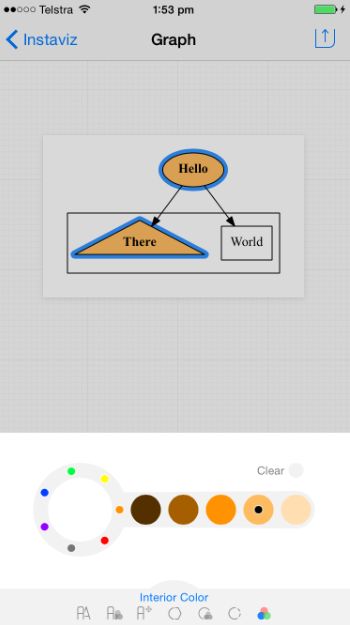
Instaviz 2.1 screen.
Pixelglow Software today launched Instaviz 2.1 to support Apple's iPhone 6s, 6s Plus and the iOS 9 update. The intelligent diagram sketcher now works with iPad multitasking in both Slide Over and Split View modes, allowing users to run another app at the same time. The developer also launched Instaviz Lite, a free app that showcases the core sketching features of Instaviz.

"Our customers absolutely love our rebuilt Instaviz 2, giving us 75% 5-star reviews since our relaunch in June," says developer Glen Low, winner of two Apple Design Awards. "With the new free Instaviz Lite, even more users will see how easy it really is, turning doodles into diagrams."

Instaviz users create formal diagrams by beginning with rough sketches of shapes, typing in some text, then linking the shapes together. Instaviz and Instaviz Lite neaten and rearrange them as the users work. With the paid app, the users can refine their ideas with different fonts, colours, styles and shapes. The diagrams can be shared on the paid app in different formats and through different channels, including email, message, print, AirDrop, and a number of popular social networks such as Facebook, Flickr, Pinterest, Twitter or WhatsApp.

"This is the best simple visual thinking, simple diagramming or back-of-the-napkin thinking app available for the iPhone and iPad," said Dr George Huba, a prominent mind-mapping and healthcare advocate. "And, unlike the napkin you draw on at lunch, diagrams from the program can look good enough to use in books and professional journals without further enhancements. And unlike those napkins, the diagrams from Instaviz come without ink smears, coffee cup rings, and grease stains from errant French fries, freedom fries, chips, British fish and chips, sweet potato fries, tempura, or pizza!"

Instaviz is built on two key technologies: Recog and Graphviz. Recog is a new shape recognition library. Trained on over 2,500 sketches drawn by real users, Recog uses advanced fuzzy logic and sophisticated geometric algorithms to recognize sketches in a split second. Graphviz is an automated graph layout engine. The industry standard for automated graph layout, Graphviz represents over 20 years of AT&T information visualisation research.

Interested?

Download the PC/Mac companion app, Instavue (Instaviz app on a mobile device required)

14 September 2015

Singtel, StarHub allow customers to preregister for iPhone 6s, 6s Plus

Source: Singtel website.

Singtel will offer Apple's iPhone 6s and iPhone 6s Plus from Friday, 25 September, 2015. "Customers can pre-register for iPhone 6s and iPhone 6s Plus beginning on Tuesday, 15 September, 2015, at www.iphone.singtel.com," said a Singtel spokesperson. 

The announcement follows a similar statement from rival Singapore telco 
StarHub the week before. 

Source: StarHub website.

StarHub will also offer Apple's iPhone 6s and iPhone 6s Plus, from Friday, 25 September. Customers can register their interest for the iPhone 6s and iPhone 6s Plus at www.starhub.com/iphone.

Read the TechTrade Asia blog post about the new iPhones

10 September 2015

Preorder the new iPhones from September 12 in selected countries


Source: Apple. A rose gold version.

Apple has announced the iPhone 6s and iPhone 6s Plus, which feature Retina HD displays made from 7000 series aluminum, the same alloy used in the aerospace industry, in metallic finishes that now include rose gold, a pink shade.

“The only thing that has changed with iPhone 6s and iPhone 6s Plus is everything — 3D Touch lets users interact with iPhone in entirely new and fun ways, and the innovative Live Photos brings your pictures to life,” said Philip Schiller, Apple’s Senior VP of Worldwide Marketing. “These are the most advanced iPhones ever, with 7000 series aluminum, ion-strengthened glass, the new 64-bit A9 chip, 12-megapixel iSight and 5-megapixel FaceTime HD cameras, faster Touch ID, LTE and Wi-Fi.”

Key features include 3D Touch capability, which Apple says will enable new ways to access features and interact with content. Live Photos, 12-megapixel photos reveal the moments immediately before and after the shot was taken,
3D Touch and other advancements are powered by the Apple-designed A9 chip, delivering faster performance and better battery life.

By sensing pressure to enable new gestures — Peek and Pop — users can dip in and out of content without losing their place. Press lightly to 'Peek' at a photo, email, web page or other content, and press deeper to 'Pop' into the content itself. With Quick Actions, 3D Touch provides shortcuts to the things users do most, so they can send a message or take a selfie from the Home screen.
High-definition video improves with support for 4K — with a resolution of 3,840 x 2,160, delivering over 8 million pixels — and the expansion of optical image stabilisation to video on iPhone 6s Plus. With the latest version of iMovie on the iPhone, two simultaneous streams can be edited.

Additional camera advancements include a new 12-megapixel sensor with advanced pixel technology and an Apple-designed image signal processor. A new 5-megapixel FaceTime HD camera and Retina Flash, which momentarily makes the display three times brighter with True Tone lighting, for bright pictures in low light.

A9, Apple’s third-generation 64-bit chip, has a 70% faster CPU and 90% faster GPU performance than the A8, plus gains in energy efficiency. M9, Apple’s motion coprocessor, is embedded into A9, allowing more features to run all the time at lower power, including “Hey Siri,” without the iPhone needing to be plugged in.

With advanced wireless technologies including faster Wi-Fi and LTE Advanced, iPhone 6s and iPhone 6s Plus users can browse, download and stream content faster¹. The new iPhones also support up to 23 LTE bands — the most in any smartphone — for better worldwide roaming.

The iOS 9 mobile operating system offers proactive assistance, powerful search and improved Siri features. The Notes app has been redesigned, there is more detailed transit information in Maps, and the News app has been revamped² . Apple promises that software updates that require less space to install and will come with advanced security features.

Interested?

The iPhone 6s and iPhone 6s Plus will be available in gold, silver, space gray and rose gold. Both models will be available in Australia, mainland China, Hong Kong, Japan, New Zealand, and Singapore, beginning Friday, September 25, with pre-orders beginning Saturday, September 12.

Apple-designed accessories including leather and silicone cases in a range of colours and Lightning Docks in colour-matched metallic finishes will also be available.

¹ Data plan required. LTE Advanced and LTE are available in select markets and through select carriers. Speeds vary based on site conditions and carrier. For details on LTE support, contact your carrier and see www.apple.com/iphone/LTE.
² Transit information in Maps will be available in select major cities including Baltimore, Berlin, Chicago, London, Mexico City, New York City, Philadelphia, the San Francisco Bay Area, Toronto and Washington DC, as well as over 300 cities in China, including Beijing, Chengdu and Shanghai. News app availability varies by country.

7 June 2015

iOS conceptualisation tool Instaviz 2.0 debuts

Pixelglow Software, which focuses on developing intuitive business applications, has launched Instaviz 2.0. Released in December 2008, Instaviz allows users to visualise, refine and share ideas and concepts, and is one of the most popular diagramming apps on the iOS platform.

Source: Pixelglow Software. Click on the image to view a larger version.

Instaviz is regularly seen in the Top 100 Business Apps list at the App Store, and over 17,700 copies have been purchased, Pixelglow says. Users have rated it three-and-a-half out of five stars at the App Store.

"Here's what I like about it," said Terry White, Worldwide Design Evangelist for Adobe Systems. "I don't have to worry about picking tools to draw the various shapes. I have a tool right here: it's my finger!"

Users start by sketching some rough shapes, adding some text, then linking the shapes together. Instaviz neatens the shapes and arranges them elegantly as the users work, turning them into coherent diagrams that can be customised with different fonts, colours, styles and shapes. The work can be shared through email, messages, or AirDrop, as well as on social media such as Facebook, Twitter or WhatsApp.

Version 2.0 is a major rewrite of what the company says is the first iOS diagram sketcher. Diagrams, mind maps and flowcharts can be shared more easily with the new version, said Australia-based Pixelglow Developer Glen Low.

"I've always seen Instaviz as an extension of my mind," Low said. "When I have an idea or relation in my head, I want to get it down quickly without fussing about where to place the concepts, or getting stuck in endless popups and modes. In pursuing that seamless experience for all users, I've rebuilt the app from the ground up over 4.5 years to create this new version."

Low has revamped the user interface and included help demo videos for the upgraded app. New features include:
  • Fresh graphics, icons and toolbars
  • Improved layout, text, animation, interaction and rendering
  • Enhanced font, colour and style settings
  • Sharing through email, message, print, over-the-air and social media
  • Help demo videos
  • Support for iOS 7 and 8
  • Compatibility with iPhone 5, 6, and 6+ screen formats

Instaviz 2.0* is US$7.99 and available worldwide exclusively through the App Store Productivity category. Existing users can upgrade for free. Multiple languages are supported, including English, Chinese (Simplified), Chinese (Traditional), and Japanese.

Interested?

Purchase the app

*Device requirements: iPhone 4, iPad 2, iPod Touch 5G or better; iOS 7, 8 or better; 4MB of space.

1 June 2015

Migrating from the Samsung Galaxy S4 to the S6

I just bought a Samsung Galaxy S6 from Singtel as part of contract renewal. I had hoped to hold out till prices fell a bit but I learned about Smart Switch and it sounded great, sooo.. yeah. I have a new phone. I had liked the silver handset on the try-out counter, but apparently that's gold, not silver. I decided to go with black - traditional and no problems with colour recognition.

Warranty registration woes

Next thing up, registering the warranty online. This did not work. The Samsung website kept saying I had an incorrect serial number. This is a common situation for me, but still frustrating. There are only 2 numbers on the bar code sticker that Singtel provided. The IMEI as listed on the receipt, and one other number. Neither number works. So I was going to mail the warranty card, but the card is missing the dealer’s company stamp. I had to go back to the Singtel shop later to get that – more about that later.

MobileSwop or not?

Then I decided not to bring the phone anywhere till I had at least a bumper. Singtel has this offer where you pay a nominal amount a month as insurance. The MobileSwop service is only available to subscribers of getting a new line, or recontracting. It's available 24 hours; if you decide you want to swop your phone (cheaper) or replace it, there are no questions asked. Swops cost S$86 to S$181 depending on the original price of the phone, while replacements cost S$214 to S$532. Depending on the time of the request, you could get the new phone within four hours. The terms of the service are that a subscriber can make two swops or one replacement within 12 months of the delivery date of the last service request; there is an extra charge of S$85.60 per trip for trips on Sundays though. The guys at Singtel said people who subscribe take it up for a maximum of six months as the value of the phone depreciates thereafter. I thought it was a clever offer but said no. 

I shattered the screen of my iPhone 5, even with the bumper on, about three months in, two years ago – before they had this offer. I’ve since seen many people living with cracked screens because it costs so much to replace one. The thing is, my Samsung Galaxy S4 has lasted me roughly two years, and I have dropped it several times. So I might just have been really unlucky with the iPhone, and really lucky with the Galaxy, but to my mind the Samsung Galaxy phones are hardier and I probably wouldn’t need the  insurance. But I would need some protection.


Bumper shopping woes

There are several stores along the same corridor at Jurong Point which sell phone cases: Challenger, Gadget World, and Digital Style among them. The Samsung store is at one corner with the Singtel shop opposite it. I went to each one and there just aren’t many S6 covers on sale compared to the iPhone 6 and iPhone 6S. Admittedly the S6 is much newer but I had hoped for much more variety for cases. There were very few pink ones, and I settled on a Spigen in mint (it’s almost S$20 cheaper at Gadget World compared to the Samsung store, by the way). It's quite pretty, with a non-slip texture and feels solid enough to protect the phone, it's just that it's not pink. The nice cashier actually offered to put on the casing for me when I asked how it is used, but I didn’t have the phone with me.

Migrating takes time

Now I remember moving from the iPhone 4 to the iPhone 5 very fondly. When I keyed in my Apple ID, the brand new iPhone 5 simply asked me if I wanted to restore everything from my most recent backup, and that was it. I got my apps, my WhatsApp chats, and everything else off iTunes. I don’t recall how I migrated from the iPhone 5 to the Galaxy S4, but however difficult it was, I discovered how much better it is to swipe your finger along the keyboard instead of typing, and nothing on iOS mattered any more.

So when I saw that Samsung has an app called Smart Switch, I thought it would be the same type of migration. Smart Switch is a wonderful app. You download it on your old phone and on your new phone; choose a list of what you would like to migrate, then press ‘send’ on the old phone, and ‘receive’ on the new phone. Everything you select ends up on the new phone without a hitch. I got my contacts, all 27* of them, my SMS history, calendar, even my alarms, all activated exactly as before. 

The problem is that the apps don’t come over as well. Smart Switch will tell you which ones to download, which is very helpful, but you still need to download and configure each one before your new phone starts looking familiar again. This is assuming you were up to date with apps on your old phone; if you were not, then the updated app on the new phone can still look quite alien.

What, WhatsApp?

Of course I had been expecting all my WhatsApp conversations from the old phone to miraculously appear on the new phone. This did not happen. You start off with a blank slate, plus membership in any of the groups you were in before. According to helpful advice online, you’re supposed to back up the conversations onto your SD card and then insert the SD card in the new phone before you activate WhatsApp. WhatsApp will notice you have this backup and ask if you would like to restore, and voila! 

Of course I didn’t do this before I activated WhatsApp, and the S6 doesn’t have SD card capability. I believe there was a workaround for this, but once you have transferred your SIM card from the old phone to the new phone, you can’t use WhatsApp on the old phone – WhatsApp only allows one device to be used at a time. I can try telling WhatsApp that the old phone is actually where my WhatsApp life resides.. and then email backups to myself.. but at the moment I’m just making do without a WhatsApp history.

Deleting from Dropbox

Another shock was Dropbox. I had received 48 GB of extra space for two years as a Galaxy Gift when I got the S4. I had naively assumed that the subscription would continue if I continued with a new Samsung phone. It doesn’t. This means I have to make sure that my present Dropbox setup – which worked like clockwork, backing up the pictures taken on the S4 to Dropbox and making them available on my laptop – will still work even when that 48 GB expires, and that I find a new home for any extra files as soon as possible. To be fair, I subsequently discovered that Samsung has arranged a new Galaxy Gift with the S6, this time with Microsoft’s OneDrive – 100 GB for the next two years – but it is still a pain to move from one cloud storage service to another, and of course Google Photos has been launched and it’s unlimited storage for free. Dropbox, incidentally, starts reminding you of the expiry about two months before so that you have ample time to decide what to do. It also generously gives you 3 GB free - which happens to be about 1 GB more than my total usage for the moment.

Stymied by photo backups

When I then downloaded and installed Dropbox on the S6, it asked me if it should back up all photos. I couldn’t say yes. Remember, I had used Smart Switch to transfer all my pictures on the S4, over 3,000 of them, over to the S6. This meant that backing up the S6 pictures to Dropbox would in effect create a second copy of the S4 backup on Dropbox, plus any new pictures taken with the S6, of course. I could have done that and then deleted the files.. but decided to leave things alone, and send the pictures to OneDrive instead. I feel like I’m littering my way through the Internet with the same copies of pictures I might not want, but better safely stored than not at all.

An odd question

And then in the midst of the migration, Singtel sent me an odd SMS that it wanted me to reply 'yes' or 'no' to. Just like when banks verify that you made a big withdrawal or credit card purchase, Singtel wanted to check if I had actually purchased a Galaxy S6. One that I had gone personally to the Singtel shop to buy, and shown my ID to get since it was tied to a contract renewal. Maybe they think there are a lot of people wandering around impersonating others? Someone from Singtel did get in touch on Twitter to say that no offence is meant, but I wasn't offended, just disquieted at what possible motivations that can be for such a text message.

SIMplicity, not

So after downloading my previous apps, I finally decided to switch SIMs. I’m used to the sales guys at the shop doing it for me, but this time the ones at the Singtel shop didn’t (OK, I admit I was the last customer of the evening and they were probably tired). They showed me where my SIM was on the old phone and the pin that you use to get the SIM drawer open on the new phone, and sent me home to figure it out by myself. It was not easy. 

There are no instructions printed on the SIM holder on the S4 on what you should do. I didn’t know how to get the SIM card** out of the Galaxy S4. I tried scraping it out, looking for a lever to lift the holder up, and sticking the pin at this pin-sized hole on the SIM card holder (there is a hole there that's the right size..). It took a long while before I decided to try pushing the SIM card in to see if that would make it pop out. 

There are no instructions on the S6, either. You have to push the pin in quite a way and I was wondering the whole time if I was going to break something. When the drawer pops out, it doesn’t come out all the way, and I wasn’t sure at first which way to put in the SIM card. It was only after I’d realised that the entire drawer can be removed that I saw the (very small) outline of the card printed on the drawer, with the notch to one side to guide me.

Why, Wi-Fi??

So now that I have the SIM finally in the S6, the challenges continue. My Singtel Wi-Fi and my Wireless@SGx EAP-SIM connections don’t work. Wireless&SG does connect automatically, but the connectivity doesn't work out for me. When I went back to the Singtel shop to get my warranty card stamped (very quick, I didn’t even have to get a number to join a queue), I asked about the Wi-Fi. The nice Singtel service staff saw how Singtel Wi-Fi would refuse to connect properly. It would appear connected, and then cycle through and try to connect, over and over. He set the configuration manually, and then admitted defeat. I’m to call the customer service hotline at 1688 to ask them about that, because he says it’s not the phone at fault.

I’ve also been tweeting my challenges with trying to get EAP-SIM to work. The instructions are on a PDF that happily downloads each time I refer to the Singtel website. I must have downloaded this file six, seven times by now. The phone never asks me if I want to retrieve the existing file to read it, but does give me the option to replace the one I have already downloaded. There doesn’t seem to be any other way to read it, which is fine on Wi-Fi but not so fine when you have a mobile data limit and your Singtel Wi-Fi doesn’t seem usable (unlimited downloads till July 2015! FWIW when you can’t even get on it). 

Singtel has been very responsive on social media, asking if they can help – considering I didn’t hashtag them or mention them – so I have taken some screenshots to show how my screen doesn’t look anything like their screen and shared those. I've never actually had any follow-up beyond that initial question though.

Pros & cons

Having said that there are many things to love about the S6.
  • Longer battery life. The S6 probably has much fewer apps on it taking up processing power than the S4, but it lasts waaay longer. Batteries do run down more quickly over time too, of course. I actually watched Google's I/O Developer Conference 2015 through a livestream, which was approximately 2 hours worth of video. The battery life percentage went from 100% to 54% during that time.
  • It’s faster, probably for the same reasons. It’s also got more space, seeing as I got the 64GB version and no longer get complaints that apps can’t be updated because there is no space so possibly there is less juggling of memory space.
  • Faster network. I see a little 4G+ icon on the phone sometimes. It seems faster. 4G was already really fast compared to my home broadband with StarHub, which is still at the lowest speed possible (plus it’s a really old cable modem).  
  • The promise of Singtel Wi-Fi. I really like the idea of bundled Wi-Fi. I hope that I actually get to make use of this.
  • Better camera. I don’t take pictures at maximum resolution as I don’t need to print anything, but my snaps look lovely – nice colours, crisp edges and all.
  • Pink theme. I couldn’t get a pink case but Samsung has a cute pink theme, with cartoonish icons and hearts. It’s a big departure from the sleek organic lines that are used in the marketing campaign, but it’s pink so I’m using that for now. I also have a pink theme for SwiftKey – roses appear when I type.
  • Galaxy Gifts. There were a bunch of interesting offers but most of them are for free trials for a few months each, so I didn’t bother to download them. They’re worth quite a bit in total though. I’ve already mentioned the OneDrive offer, and I downloaded Kindle for Samsung as you get a free e-book every month, plus the privilege of buying the other e-books on offer at discounts. There were four e-books to choose from, but none appealed to me.
  • S Health. I didn’t use it on the S4 but later learned that phone apps are often just as accurate as health bands, so I’ve switched it on and it’s interesting to see how many steps I take from day to day.
  • Muting the phone by turning it face down. This feature may actually have been available for some time, but I never thought about using it till now.
  • Swiping the palm across the screen to do a screen capture. Again, this might be an old feature, but has only been activated now because screen captures using the power and the home button didn’t always work well on the S4. It seems to be much more reliable using the buttons on the S6 though, so I haven’t bothered to do a screen capture with the palm-swipe feature.


There are also a few things I dislike.
  • The lock screen has the numbers for the PIN squished into the bottom third of the screen. I haven’t seen any way to make them bigger. The screen also blacks out very quickly, which is a bit disconcerting.
  • The bottom left button, which often used to bring up the menu for the app, now displays a stack of which apps are currently open, with an option to close them all. I don’t really care which ones are open as I would just tap on the app’s icon to bring it up, and now I have to look for the app menu elsewhere. There is no consistency on where you might stash that.
  • It’s a bit wider than I would like. The screen is larger overall which is nice, but it was difficult to use the S4 with one hand before, and impossible with the S6. There is a one-handed mode that can be switched on through Settings, but I haven’t found it yet. It’s not under Display or under Motions & Gestures.
  • It’s heavier. Not appreciably so, but there is a noticeable difference between the S4 and S6 that I am still getting used to.


The list of likes are way longer and more about productivity enhancement than the dislikes, which will probably just need getting used to. So all in all, I still like the Samsung Galaxy series and consider the S6 a definite step up. I am open to using other Android phones and admit that some of the features for other brands have been extremely tempting. So who knows what my next phone will be?

*How did I get through life with only 27 contacts? I didn’t have a choice. I had very little space left on the primary memory, which was probably why the Galaxy S4 hiccupped one day, switched itself off, and when it came back on again, I didn’t have an address book any more. I hadn’t been able to back up my contacts for a long time because an Android update had limited what could be saved onto the SD card, including backups. It wouldn’t allow restoring from the stored backups, either. I did try importing from an old backup on Gmail, but I don’t think Gmail ever synced with the phone. I was very thankful I had a list of some 500 WhatsApp contacts and/or conversations, from which I could reassemble my life.

**There will be people who point out that the SIM sizes are incompatible. The Galaxy S4 uses a larger SIM card than the Galaxy S6. Remember I mentioned my iPhone 5? I’d been using the SIM card in the S4 with an adapter, so I already have a SIM card of the right size. So there.